Bastion with Private Subnet
Deploy a VPC with public and private subnets on Spinifex, then use a bastion host as the only route to an isolated EC2 instance that has no internet access.
Overview
Deploy a VPC with public and private subnets where the private subnet has no internet access. A bastion host in the public subnet is the only way to reach instances in the private subnet. This pattern is used for sensitive workloads that must remain isolated from the internet — the private instance cannot make or receive any connections outside the VPC.
Architecture:
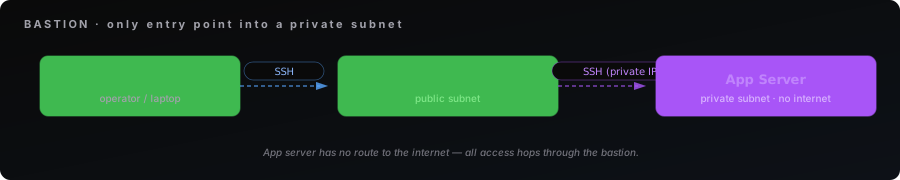
What you'll learn:
- Creating public and private subnets in a VPC
- Isolating compute instances from the internet using route tables and security groups
- Using a bastion host as the sole access point to private resources
- SSH hopping through a bastion to reach private instances
Use cases:
- Sensitive data processing that must not have internet egress
- Internal services that should only be reachable within the VPC
- Compliance workloads requiring network isolation
Prerequisites:
- Spinifex installed and running (see Installing Spinifex)
- An Ubuntu 26.04 AMI imported (see Setting Up Your Cluster)
- OpenTofu or Terraform installed
Instructions
Step 1. Get the Template
Clone the Terraform examples from the Spinifex repository:
git clone --depth 1 --filter=blob:none --sparse https://github.com/mulgadc/spinifex.git spinifex-tf
cd spinifex-tf
git sparse-checkout set docs/terraform
cd docs/terraform/bastion-private-subnet
Or create a main.tf file and paste the full configuration below.
# Example 2: Bastion Host with Private Subnet
#
# Deploys a VPC with both public and private subnets. A bastion host in the
# public subnet provides SSH access to an isolated instance in the private
# subnet. The private instance has no internet connectivity — ideal for
# sensitive workloads that must remain air-gapped from the internet.
#
# Architecture:
#
#   WAN ──SSH──▶ Bastion (public subnet)
#                    │
#                    ▼ SSH (private IP)
#                 App Server (private subnet, no internet)
#
# Usage:
#   export AWS_PROFILE=spinifex
#   tofu init && tofu apply
#
# After apply:
#   # SSH to the bastion
#   ssh -i bastion-demo.pem ubuntu@<bastion_ip>
#
#   # From the bastion, SSH to the private instance
#   # (the key is pre-installed at ~/.ssh/bastion-demo.pem via cloud-init)
#   ssh -i ~/.ssh/bastion-demo.pem ubuntu@<private_ip>

terraform {
  required_version = ">= 1.6.0"

  required_providers {
    aws = {
      source  = "hashicorp/aws"
      version = ">= 5.0"
    }
    tls = {
      source  = "hashicorp/tls"
      version = ">= 4.0"
    }
    local = {
      source  = "hashicorp/local"
      version = ">= 2.0"
    }
  }
}

# ---------------------------------------------------------------------------
# Variables
# ---------------------------------------------------------------------------

variable "region" {
  type    = string
  default = "ap-southeast-2"
}

variable "instance_type" {
  type    = string
  default = "t3.small"
}

variable "spinifex_endpoint" {
  type        = string
  default     = "https://127.0.0.1:9999"
  description = "Spinifex AWS gateway endpoint"
}

# ---------------------------------------------------------------------------
# Provider
# ---------------------------------------------------------------------------

provider "aws" {
  region = var.region

  endpoints {
    ec2 = var.spinifex_endpoint
    iam = var.spinifex_endpoint
    sts = var.spinifex_endpoint
  }

  skip_credentials_validation = true
  skip_metadata_api_check     = true
  skip_requesting_account_id  = true
  skip_region_validation      = true
}

# ---------------------------------------------------------------------------
# Data sources
# ---------------------------------------------------------------------------

data "aws_availability_zones" "available" {
  state = "available"
}

data "aws_ami" "ubuntu" {
  most_recent = true
  owners      = ["000000000000"]

  filter {
    name   = "name"
    values = ["*ubuntu-26.04*", "*ubuntu-24.04*"]
  }

  filter {
    name   = "virtualization-type"
    values = ["hvm"]
  }

  filter {
    name   = "root-device-type"
    values = ["ebs"]
  }
}

# ---------------------------------------------------------------------------
# SSH Key Pair (shared by bastion and private instances)
# ---------------------------------------------------------------------------

resource "tls_private_key" "bastion" {
  algorithm = "ED25519"
}

resource "aws_key_pair" "bastion" {
  key_name   = "bastion-demo"
  public_key = tls_private_key.bastion.public_key_openssh
}

resource "local_file" "bastion_pem" {
  filename        = "${path.module}/bastion-demo.pem"
  content         = tls_private_key.bastion.private_key_openssh
  file_permission = "0600"
}

# ---------------------------------------------------------------------------
# VPC
# ---------------------------------------------------------------------------

resource "aws_vpc" "main" {
  cidr_block           = "10.20.0.0/16"
  enable_dns_hostnames = true
  enable_dns_support   = true

  tags = {
    Name = "bastion-demo-vpc"
  }
}

# ---------------------------------------------------------------------------
# Internet Gateway — only the public subnet routes through this
# ---------------------------------------------------------------------------

resource "aws_internet_gateway" "igw" {
  vpc_id = aws_vpc.main.id

  tags = {
    Name = "bastion-demo-igw"
  }
}

# ---------------------------------------------------------------------------
# Public Subnet — bastion host lives here
# ---------------------------------------------------------------------------

resource "aws_subnet" "public" {
  vpc_id                  = aws_vpc.main.id
  cidr_block              = "10.20.1.0/24"
  availability_zone       = data.aws_availability_zones.available.names[0]
  map_public_ip_on_launch = true

  tags = {
    Name = "bastion-demo-public"
  }
}

resource "aws_route_table" "public" {
  vpc_id = aws_vpc.main.id

  route {
    cidr_block = "0.0.0.0/0"
    gateway_id = aws_internet_gateway.igw.id
  }

  tags = {
    Name = "bastion-demo-public-rt"
  }
}

resource "aws_route_table_association" "public" {
  subnet_id      = aws_subnet.public.id
  route_table_id = aws_route_table.public.id
}

# ---------------------------------------------------------------------------
# Private Subnet — isolated instances live here (no public IPs, no internet)
# ---------------------------------------------------------------------------

resource "aws_subnet" "private" {
  vpc_id                  = aws_vpc.main.id
  cidr_block              = "10.20.2.0/24"
  availability_zone       = data.aws_availability_zones.available.names[0]
  map_public_ip_on_launch = false

  tags = {
    Name = "bastion-demo-private"
  }
}

# Private route table — no default route, no internet access
resource "aws_route_table" "private" {
  vpc_id = aws_vpc.main.id

  tags = {
    Name = "bastion-demo-private-rt"
  }
}

resource "aws_route_table_association" "private" {
  subnet_id      = aws_subnet.private.id
  route_table_id = aws_route_table.private.id
}

# ---------------------------------------------------------------------------
# Security Groups
# ---------------------------------------------------------------------------

# Bastion: SSH from anywhere
resource "aws_security_group" "bastion" {
  name        = "bastion-demo-bastion-sg"
  description = "Bastion: SSH from WAN"
  vpc_id      = aws_vpc.main.id

  ingress {
    description = "SSH"
    from_port   = 22
    to_port     = 22
    protocol    = "tcp"
    cidr_blocks = ["0.0.0.0/0"]
  }

  egress {
    description = "All outbound"
    from_port   = 0
    to_port     = 0
    protocol    = "-1"
    cidr_blocks = ["0.0.0.0/0"]
  }

  tags = {
    Name = "bastion-demo-bastion-sg"
  }
}

# Private instances: SSH only from the bastion security group
resource "aws_security_group" "private" {
  name        = "bastion-demo-private-sg"
  description = "Private: SSH from bastion only"
  vpc_id      = aws_vpc.main.id

  ingress {
    description     = "SSH from bastion"
    from_port       = 22
    to_port         = 22
    protocol        = "tcp"
    security_groups = [aws_security_group.bastion.id]
  }

  egress {
    description = "VPC internal only"
    from_port   = 0
    to_port     = 0
    protocol    = "-1"
    cidr_blocks = ["10.20.0.0/16"]
  }

  tags = {
    Name = "bastion-demo-private-sg"
  }
}

# ---------------------------------------------------------------------------
# Bastion Host (public subnet)
# ---------------------------------------------------------------------------

resource "aws_instance" "bastion" {
  ami           = data.aws_ami.ubuntu.id
  instance_type = var.instance_type

  subnet_id              = aws_subnet.public.id
  vpc_security_group_ids = [aws_security_group.bastion.id]
  key_name               = aws_key_pair.bastion.key_name

  associate_public_ip_address = true

  # Copy the SSH private key onto the bastion so you can hop to private instances
  user_data_base64 = base64encode(<<-USERDATA
    #!/bin/bash
    set -euo pipefail
    mkdir -p /home/ubuntu/.ssh
    cat > /home/ubuntu/.ssh/bastion-demo.pem <<'KEY'
    ${tls_private_key.bastion.private_key_openssh}
    KEY
    chmod 600 /home/ubuntu/.ssh/bastion-demo.pem
    chown -R ubuntu:ubuntu /home/ubuntu/.ssh
  USERDATA
  )

  tags = {
    Name = "bastion-demo-bastion"
  }
}

# ---------------------------------------------------------------------------
# Private Instance (private subnet — no public IP, no internet)
# ---------------------------------------------------------------------------

resource "aws_instance" "private" {
  ami           = data.aws_ami.ubuntu.id
  instance_type = var.instance_type

  subnet_id              = aws_subnet.private.id
  vpc_security_group_ids = [aws_security_group.private.id]
  key_name               = aws_key_pair.bastion.key_name

  tags = {
    Name = "bastion-demo-private-app"
  }
}

# ---------------------------------------------------------------------------
# Outputs
# ---------------------------------------------------------------------------

output "note" {
  value = "EC2 instances can take 30+ seconds to boot after apply. If SSH is unreachable, wait and retry."
}

output "bastion_public_ip" {
  value = aws_instance.bastion.public_ip
}

output "private_instance_ip" {
  value = aws_instance.private.private_ip
}

output "ssh_to_bastion" {
  description = "SSH to the bastion host"
  value       = "ssh -i bastion-demo.pem ubuntu@${aws_instance.bastion.public_ip}"
}

output "ssh_to_private_from_bastion" {
  description = "From the bastion, SSH to the private instance (key is pre-installed via cloud-init)"
  value       = "ssh -i ~/.ssh/bastion-demo.pem ubuntu@${aws_instance.private.private_ip}"
}Step 2. Deploy
The workbook defaults to t3.small (2 vCPU, 2 GiB) for both bastion and private instance. On clusters without that type registered, override with TF_VAR_instance_type — query what's available with aws ec2 describe-instance-types.
export AWS_PROFILE=spinifex
tofu init
tofu apply
Step 3. Connect
Note: EC2 instances can take 30+ seconds to boot after apply. If SSH is unreachable, wait and retry.
SSH into the bastion:
ssh -i bastion-demo.pem ubuntu@<bastion_public_ip>From the bastion, SSH to the private instance. The key is pre-installed at ~/.ssh/bastion-demo.pem via cloud-init:
ssh -i ~/.ssh/bastion-demo.pem ubuntu@<private_ip>Step 4. Verify Isolation
From the private instance, confirm there is no internet connectivity:
# This should time out — the private instance has no route to the internet
curl --connect-timeout 5 https://deb.debian.org || echo "No internet access (expected)"
The private instance can only communicate within the VPC (10.20.0.0/16). Its security group restricts egress to VPC-internal traffic only.
Clean Up
tofu destroyTroubleshooting
Cannot SSH to Private Instance
The private instance has no public IP — it is only reachable from the bastion. SSH to the bastion first, then use the pre-installed key to hop:
ssh -i bastion-demo.pem ubuntu@<bastion_ip>
ssh -i ~/.ssh/bastion-demo.pem ubuntu@<private_ip>
If the key is missing on the bastion, check that cloud-init completed successfully:
sudo journalctl -u cloud-init --no-pager
ls -la ~/.ssh/bastion-demo.pem
Private Instance Can Reach the Internet
If the private instance unexpectedly has internet access, check that its route table has no default route:
aws ec2 describe-route-tables --profile spinifexThe private route table should have no 0.0.0.0/0 route. Also verify the private security group egress is restricted to the VPC CIDR (10.20.0.0/16).
AMI Not Found
Ensure you have imported an Ubuntu 26.04 image:
aws ec2 describe-images --owners 000000000000 --profile spinifex