S3-Backed Web App
Deploy a Flask file-sharing app on EC2 backed by S3 (Predastore) with Terraform, using an IAM instance profile and short-lived STS credentials from IMDS.
Overview
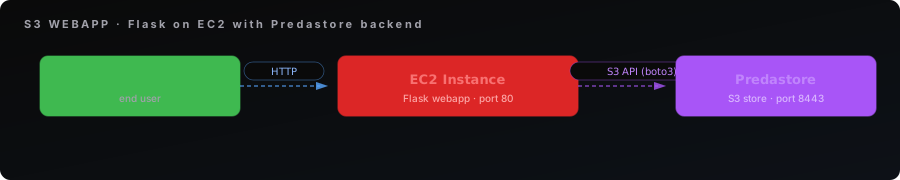
Deploy an EC2 instance running a Flask file-sharing web application backed by S3 (Predastore). Users can upload files through a web form and browse uploaded content — demonstrating Terraform managing both compute and object storage together.
This workbook uses the idiomatic AWS credential model: the instance is launched with an IAM instance profile and the app pulls short-lived STS credentials from IMDS (169.254.169.254) through boto3's default credential chain. No long-lived S3 keys are baked into the instance. The Terraform run still uses the operator's admin credentials (to create the bucket, role, profile, and instance), but the running instance authenticates to S3 with credentials it fetches at runtime and which expire in ~1 hour.
Architecture:
What you'll learn:
- Configuring the AWS provider with both Spinifex and Predastore endpoints
- Creating S3 buckets on Predastore via Terraform
- Defining an IAM role, least-privilege managed policy, and instance profile, and passing the role to an instance (
iam:PassRole) - How the instance obtains short-lived credentials from IMDS via boto3's default credential chain — no static keys on the instance
- Deploying a Python webapp with cloud-init that signs S3 requests with the STS session token
Prerequisites:
- Spinifex installed and running (see Installing Spinifex)
- Predastore running (S3 API on port 8443)
- An Ubuntu 26.04 AMI imported (see Setting Up Your Cluster)
- OpenTofu or Terraform installed
- The operator identity running the Terraform apply (
AWS_PROFILE=spinifex) must be allowed to manage IAM and pass the role:iam:CreateRole,iam:CreatePolicy,iam:AttachRolePolicy,iam:CreateInstanceProfile,iam:AddRoleToInstanceProfile, andiam:PassRoleon the new role. The bootstrap admin profile satisfies this. - The EC2 instance must be able to reach Predastore — use the host's br-wan IP, not localhost
Instructions
Step 1. Get the Template
Clone the Terraform examples from the Spinifex repository:
git clone --depth 1 --filter=blob:none --sparse https://github.com/mulgadc/spinifex.git spinifex-tf
cd spinifex-tf
git sparse-checkout set docs/terraform
cd docs/terraform/s3-webapp
Or create the files manually and paste the full configuration below.
Step 2. Create terraform.tfvars
Before deploying, create a terraform.tfvars with your Predastore credentials. The predastore_host must be reachable from inside the VPC — use the host's br-wan or LAN IP, not localhost.
# Copy this to terraform.tfvars and fill in your values.
#
# The predastore_host must be reachable from INSIDE the VPC guest — not
# localhost. Use the host's br-wan or LAN IP, e.g. "192.168.1.10:8443".
#
# s3_access_key / s3_secret_key are the operator credentials for the Terraform
# run only — they create the bucket on Predastore and the IAM role/profile.
# They are NOT passed to the instance; the instance pulls short-lived STS
# credentials from IMDS via its instance profile.

predastore_host = "192.168.1.10:8443"
s3_access_key   = "AKIAIOSFODNN7EXAMPLE"
s3_secret_key   = "wJalrXUtnFEMI/K7MDENG/bPxRfiCYEXAMPLEKEY"

# Optional overrides:
# spinifex_endpoint    = "https://localhost:9999"
# predastore_endpoint  = "https://localhost:8443"
# bucket_name          = "webapp-uploads"
# region               = "ap-southeast-2"
Step 3. Create main.tf
# Example 3: S3-Backed Web Application
#
# Deploys an EC2 instance running a simple file-sharing webapp backed by S3
# (Predastore). Users can upload files through a web form and browse uploaded
# content — demonstrating Terraform managing both compute (Spinifex) and
# object storage (Predastore) resources together.
#
# Architecture:
#
#   Browser ──HTTP──▶ EC2 Instance (Flask webapp, port 80)
#                         │  ▲ IMDS: short-lived STS creds (ASIA + token)
#                         │  └──── 169.254.169.254
#                         ▼ S3 API (boto3, SigV4 with session token)
#                     Predastore (port 8443)
#
# Credentials:
#   The Terraform run uses the operator's admin keys (s3_access_key /
#   s3_secret_key) to create the bucket, IAM role, instance profile, and
#   instance. The INSTANCE receives no long-lived secret — boto3's default
#   credential chain pulls short-lived STS credentials from IMDS
#   (169.254.169.254), resolved via the attached instance profile -> role.
#
# Prerequisites:
#   - Spinifex services running (gateway on port 9999)
#   - Predastore running (S3 API on port 8443)
#   - The operator identity (AWS_PROFILE=spinifex) must be allowed
#     iam:CreateRole / iam:CreatePolicy / iam:AttachRolePolicy /
#     iam:CreateInstanceProfile / iam:AddRoleToInstanceProfile and
#     iam:PassRole on the new role.
#   - The EC2 instance must be able to reach the Predastore endpoint.
#     Set `predastore_host` to the IP reachable from inside the VPC
#     (e.g. the host's br-wan IP, NOT localhost).
#
# Usage:
#   cd spinifex/scripts/iac/aws/examples/03-s3-webapp
#   export AWS_PROFILE=spinifex
#   tofu init && tofu apply
#
# After apply:
#   curl http://<public_ip>          # File browser UI
#   ssh -i s3-webapp-demo.pem ubuntu@<public_ip>

terraform {
  required_version = ">= 1.6.0"

  required_providers {
    aws = {
      source  = "hashicorp/aws"
      version = ">= 5.0"
    }
    tls = {
      source  = "hashicorp/tls"
      version = ">= 4.0"
    }
    local = {
      source  = "hashicorp/local"
      version = ">= 2.0"
    }
  }
}

# ---------------------------------------------------------------------------
# Variables
# ---------------------------------------------------------------------------

variable "region" {
  type    = string
  default = "ap-southeast-2"
}

variable "instance_type" {
  type    = string
  default = "t3.small"
}

variable "spinifex_endpoint" {
  type        = string
  default     = "https://127.0.0.1:9999"
  description = "Spinifex AWS gateway endpoint (EC2/IAM)"
}

variable "predastore_endpoint" {
  type        = string
  default     = "https://127.0.0.1:8443"
  description = "Predastore S3 endpoint (for Terraform to create buckets)"
}

variable "predastore_host" {
  type        = string
  description = "Predastore host:port reachable from inside the VPC (e.g. 192.168.1.10:8443)"
}

variable "s3_access_key" {
  type        = string
  description = "Operator S3 access key for the Terraform run (creates the bucket on Predastore); the instance uses IMDS, not this key"
}

variable "s3_secret_key" {
  type        = string
  sensitive   = true
  description = "Operator S3 secret key for the Terraform run; the instance uses IMDS, not this key"
}

variable "bucket_name" {
  type    = string
  default = "webapp-uploads"
}

# ---------------------------------------------------------------------------
# Provider — EC2 via Spinifex gateway, S3 via Predastore
# ---------------------------------------------------------------------------

provider "aws" {
  region     = var.region
  access_key = var.s3_access_key
  secret_key = var.s3_secret_key

  endpoints {
    ec2 = var.spinifex_endpoint
    s3  = var.predastore_endpoint
    iam = var.spinifex_endpoint
    sts = var.spinifex_endpoint
  }

  s3_use_path_style = true

  skip_credentials_validation = true
  skip_metadata_api_check     = true
  skip_requesting_account_id  = true
  skip_region_validation      = true
}

# ---------------------------------------------------------------------------
# Data sources
# ---------------------------------------------------------------------------

data "aws_availability_zones" "available" {
  state = "available"
}

data "aws_ami" "ubuntu" {
  most_recent = true
  owners      = ["000000000000"]

  filter {
    name   = "name"
    values = ["*ubuntu-26.04*", "*ubuntu-24.04*"]
  }

  filter {
    name   = "virtualization-type"
    values = ["hvm"]
  }

  filter {
    name   = "root-device-type"
    values = ["ebs"]
  }
}

# ---------------------------------------------------------------------------
# S3 Bucket (created on Predastore)
# ---------------------------------------------------------------------------

resource "aws_s3_bucket" "uploads" {
  bucket = var.bucket_name
}

# ---------------------------------------------------------------------------
# IAM Instance Role — least-privilege S3 access fetched at runtime via IMDS
# ---------------------------------------------------------------------------

resource "aws_iam_role" "webapp" {
  name = "s3-webapp-role"

  assume_role_policy = jsonencode({
    Version = "2012-10-17"
    Statement = [{
      Effect    = "Allow"
      Principal = { Service = "ec2.amazonaws.com" }
      Action    = "sts:AssumeRole"
    }]
  })
}

resource "aws_iam_policy" "webapp_s3" {
  name = "s3-webapp-policy"

  policy = jsonencode({
    Version = "2012-10-17"
    Statement = [
      {
        Sid      = "ListBucket"
        Effect   = "Allow"
        Action   = ["s3:ListBucket"]
        Resource = ["arn:aws:s3:::${var.bucket_name}"]
      },
      {
        Sid      = "ObjectRW"
        Effect   = "Allow"
        Action   = ["s3:GetObject", "s3:PutObject"]
        Resource = ["arn:aws:s3:::${var.bucket_name}/*"]
      }
    ]
  })
}

resource "aws_iam_role_policy_attachment" "webapp" {
  role       = aws_iam_role.webapp.name
  policy_arn = aws_iam_policy.webapp_s3.arn
}

resource "aws_iam_instance_profile" "webapp" {
  name = "s3-webapp-profile"
  role = aws_iam_role.webapp.name
}

# ---------------------------------------------------------------------------
# SSH Key Pair
# ---------------------------------------------------------------------------

resource "tls_private_key" "webapp" {
  algorithm = "ED25519"
}

resource "aws_key_pair" "webapp" {
  key_name   = "s3-webapp-demo"
  public_key = tls_private_key.webapp.public_key_openssh
}

resource "local_file" "webapp_pem" {
  filename        = "${path.module}/s3-webapp-demo.pem"
  content         = tls_private_key.webapp.private_key_openssh
  file_permission = "0600"
}

# ---------------------------------------------------------------------------
# VPC + Public Subnet
# ---------------------------------------------------------------------------

resource "aws_vpc" "main" {
  cidr_block           = "10.30.0.0/16"
  enable_dns_hostnames = true
  enable_dns_support   = true

  tags = {
    Name = "s3-webapp-demo-vpc"
  }
}

resource "aws_internet_gateway" "igw" {
  vpc_id = aws_vpc.main.id

  tags = {
    Name = "s3-webapp-demo-igw"
  }
}

resource "aws_subnet" "public" {
  vpc_id                  = aws_vpc.main.id
  cidr_block              = "10.30.1.0/24"
  availability_zone       = data.aws_availability_zones.available.names[0]
  map_public_ip_on_launch = true

  tags = {
    Name = "s3-webapp-demo-public"
  }
}

resource "aws_route_table" "public" {
  vpc_id = aws_vpc.main.id

  route {
    cidr_block = "0.0.0.0/0"
    gateway_id = aws_internet_gateway.igw.id
  }

  tags = {
    Name = "s3-webapp-demo-public-rt"
  }
}

resource "aws_route_table_association" "public" {
  subnet_id      = aws_subnet.public.id
  route_table_id = aws_route_table.public.id
}

# ---------------------------------------------------------------------------
# Security Group — SSH + HTTP inbound, all outbound
# ---------------------------------------------------------------------------

resource "aws_security_group" "webapp" {
  name        = "s3-webapp-demo-sg"
  description = "Allow SSH and HTTP inbound"
  vpc_id      = aws_vpc.main.id

  ingress {
    description = "SSH"
    from_port   = 22
    to_port     = 22
    protocol    = "tcp"
    cidr_blocks = ["0.0.0.0/0"]
  }

  ingress {
    description = "HTTP"
    from_port   = 80
    to_port     = 80
    protocol    = "tcp"
    cidr_blocks = ["0.0.0.0/0"]
  }

  egress {
    description = "All outbound"
    from_port   = 0
    to_port     = 0
    protocol    = "-1"
    cidr_blocks = ["0.0.0.0/0"]
  }

  tags = {
    Name = "s3-webapp-demo-sg"
  }
}

# ---------------------------------------------------------------------------
# EC2 Instance — Flask webapp that talks to Predastore S3
# ---------------------------------------------------------------------------

resource "aws_instance" "webapp" {
  ami           = data.aws_ami.ubuntu.id
  instance_type = var.instance_type

  subnet_id              = aws_subnet.public.id
  vpc_security_group_ids = [aws_security_group.webapp.id]
  key_name               = aws_key_pair.webapp.key_name
  iam_instance_profile   = aws_iam_instance_profile.webapp.name

  associate_public_ip_address = true

  # The role's permissions must exist before the instance boots and makes its
  # first IMDS-credentialed S3 call
  depends_on = [aws_iam_role_policy_attachment.webapp]

  user_data_base64 = base64encode(<<-USERDATA
    #!/bin/bash
    set -euo pipefail

    # Install dependencies
    apt-get update -y
    apt-get install -y python3-pip python3-venv

    # Create app directory and virtualenv
    mkdir -p /opt/webapp
    python3 -m venv /opt/webapp/venv
    /opt/webapp/venv/bin/pip install flask boto3

    # Write S3 credentials config
    cat > /opt/webapp/.env <<'ENVFILE'
    S3_ENDPOINT=https://${var.predastore_host}
    S3_BUCKET=${var.bucket_name}
    S3_REGION=${var.region}
    ENVFILE

    # Write the Flask application
    cat > /opt/webapp/app.py <<'PYEOF'
    import os, io, urllib3
    from flask import Flask, request, redirect, url_for, Response

    # Suppress TLS warnings for self-signed certs
    urllib3.disable_warnings(urllib3.exceptions.InsecureRequestWarning)

    # Load env
    env = {}
    with open("/opt/webapp/.env") as f:
        for line in f:
            line = line.strip()
            if "=" in line and not line.startswith("#"):
                k, v = line.split("=", 1)
                env[k] = v

    import boto3
    from botocore.config import Config

    s3 = boto3.client(
        "s3",
        endpoint_url=env["S3_ENDPOINT"],
        region_name=env["S3_REGION"],
        verify=False,
        config=Config(s3={"addressing_style": "path"}),
    )

    BUCKET = env["S3_BUCKET"]
    app = Flask(__name__)

    @app.route("/")
    def index():
        # List objects in the bucket
        try:
            resp = s3.list_objects_v2(Bucket=BUCKET)
            objects = resp.get("Contents", [])
        except Exception as e:
            objects = []

        rows = ""
        for obj in objects:
            key = obj["Key"]
            size = obj["Size"]
            rows += f'<tr><td><a href="/files/{key}">{key}</a></td><td>{size} bytes</td></tr>\n'

        return f"""<!DOCTYPE html>
    <html>
    <head><title>Spinifex S3 File Browser</title></head>
    <body style="font-family: sans-serif; max-width: 700px; margin: 40px auto;">
      <h1>Spinifex S3 File Browser</h1>
      <p>Bucket: <code>{BUCKET}</code></p>

      <h2>Upload a File</h2>
      <form method="POST" action="/upload" enctype="multipart/form-data">
        <input type="file" name="file" required>
        <button type="submit">Upload</button>
      </form>

      <h2>Files</h2>
      <table border="1" cellpadding="6" cellspacing="0" style="border-collapse: collapse;">
        <tr><th>Key</th><th>Size</th></tr>
        {rows if rows else '<tr><td colspan="2">No files yet</td></tr>'}
      </table>

      <hr>
      <p><small>Powered by Spinifex + Predastore</small></p>
    </body>
    </html>"""

    @app.route("/upload", methods=["POST"])
    def upload():
        f = request.files.get("file")
        if not f or not f.filename:
            return redirect("/")
        s3.put_object(Bucket=BUCKET, Key=f.filename, Body=f.read())
        return redirect("/")

    @app.route("/files/<path:key>")
    def download(key):
        try:
            obj = s3.get_object(Bucket=BUCKET, Key=key)
            return Response(
                obj["Body"].read(),
                headers={"Content-Disposition": f'inline; filename="{key}"'},
            )
        except Exception:
            return "Not found", 404

    if __name__ == "__main__":
        app.run(host="0.0.0.0", port=80)
    PYEOF

    # Create a systemd service so the webapp starts on boot
    cat > /etc/systemd/system/s3-webapp.service <<'SVCEOF'
    [Unit]
    Description=S3 File Browser Webapp
    After=network.target

    [Service]
    Type=simple
    ExecStart=/opt/webapp/venv/bin/python /opt/webapp/app.py
    WorkingDirectory=/opt/webapp
    Restart=always
    RestartSec=3

    [Install]
    WantedBy=multi-user.target
    SVCEOF

    systemctl daemon-reload
    systemctl enable s3-webapp
    systemctl start s3-webapp
  USERDATA
  )

  tags = {
    Name = "s3-webapp-demo"
  }
}

# ---------------------------------------------------------------------------
# Outputs
# ---------------------------------------------------------------------------

output "note" {
  value = "EC2 instances can take 30+ seconds to boot after apply. If SSH or HTTP is unreachable, wait and retry."
}

output "instance_id" {
  value = aws_instance.webapp.id
}

output "public_ip" {
  value = aws_instance.webapp.public_ip
}

output "bucket_name" {
  value = aws_s3_bucket.uploads.id
}

output "ssh_command" {
  value = "ssh -i s3-webapp-demo.pem ubuntu@${aws_instance.webapp.public_ip}"
}

output "web_url" {
  value = "http://${aws_instance.webapp.public_ip}"
}Step 4. Deploy
The workbook defaults to t3.small (2 vCPU, 2 GiB). On clusters without that type registered, override with TF_VAR_instance_type — query what's available with aws ec2 describe-instance-types.
export AWS_PROFILE=spinifex
tofu init
tofu apply
Step 5. Test the Application
Note: EC2 instances can take 30+ seconds to boot after apply. If SSH or HTTP is unreachable, wait and retry.
Open the web_url output in your browser. You should see the file browser UI. Upload a file and verify it appears in the list.
# Verify via CLI
curl http://<public_ip>

# Check the S3 bucket directly
aws s3 ls s3://webapp-uploads/ --profile spinifex --endpoint-url https://localhost:8443
Clean Up
tofu destroyTroubleshooting
Predastore Connection Refused from Instance
The EC2 instance cannot reach localhost on the host. Set predastore_host to the host's br-wan or LAN IP address:
predastore_host = "192.168.1.10:8443"S3 Bucket Creation Fails
Verify Predastore is running and accessible:
curl -k https://localhost:8443/
aws s3 ls --profile spinifex --endpoint-url https://localhost:8443
Flask App Not Starting
SSH into the instance and check the service:
ssh -i s3-webapp-demo.pem ubuntu@<public_ip>
sudo systemctl status s3-webapp
sudo journalctl -u s3-webapp --no-pager -n 50
Upload Fails with 403 AccessDenied
The instance reached S3 but was not authorized. The .env file deliberately holds no keys — credentials come from IMDS:
ssh -i s3-webapp-demo.pem ubuntu@<public_ip>
cat /opt/webapp/.env   # S3_ENDPOINT / S3_BUCKET / S3_REGION only — no keys
Check that:
- the managed policy is attached to the role (
s3:ListBucketon the bucket,s3:GetObject/s3:PutObjecton its objects), and the policy's bucket name matchesbucket_name; - the assumed-role session's account matches the bucket owner's account — Predastore enforces bucket ownership. Both are created by the same operator identity, so they align by construction; a mismatch surfaces as
403.
NoCredentialsError / No Credentials
boto3 could not obtain credentials, which means the IMDS credential chain did not resolve. From the instance:
ssh -i s3-webapp-demo.pem ubuntu@<public_ip>

# IMDSv2: fetch a token, then the role name behind the instance profile
TOKEN=$(curl -sX PUT http://169.254.169.254/latest/api/token \
  -H 'X-aws-ec2-metadata-token-ttl-seconds: 60')
curl -s -H "X-aws-ec2-metadata-token: $TOKEN" \
  http://169.254.169.254/latest/meta-data/iam/security-credentials/

# Confirm the resolved identity — expect assumed-role/s3-webapp-role/<instance-id>
aws sts get-caller-identity --endpoint-url https://<predastore_host>
If the role name is empty, the instance profile was not attached — confirm iam_instance_profile on the instance and that iam:PassRole is allowed for the operator.
AMI Not Found
Ensure you have imported an Ubuntu 26.04 image:
aws ec2 describe-images --owners 000000000000 --profile spinifex