Nginx Web Server (Load Balanced)
Deploy a VPC with two private EC2 instances running Nginx behind an internet-facing Application Load Balancer on Spinifex, using Terraform or OpenTofu.
Overview
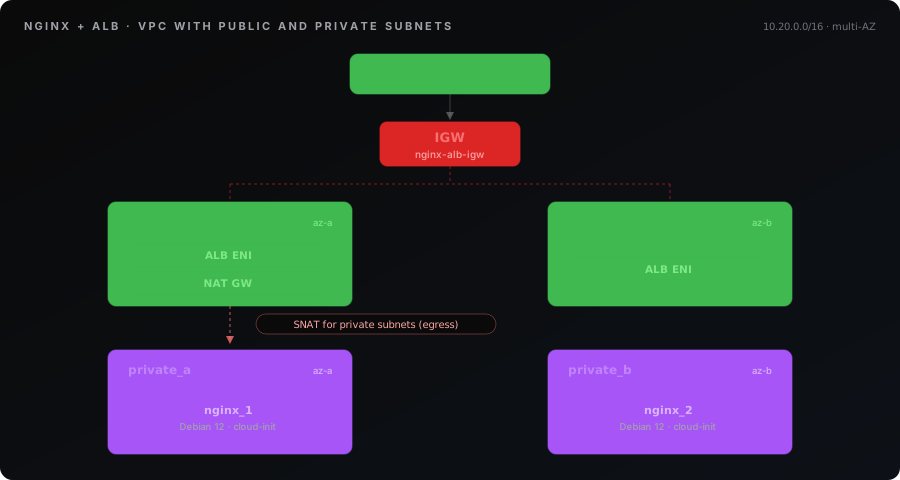
Deploy two Nginx web servers behind an internet-facing Application Load Balancer on Spinifex using Terraform/OpenTofu. This workbook provisions a VPC with public and private subnets, an internet gateway and NAT Gateway, route tables, security group, SSH key pair, an application load balancer (ALB) and two EC2 instances with cloud-init user-data that installs and starts Nginx. Only the ALB is reachable from outside the VPC — the Nginx instances live in the private subnets and reach the internet only for cloud-init bootstrapping via the NAT Gateway.
What you'll learn:
- Configuring the AWS Terraform provider to target Spinifex
- Creating a VPC with public + private subnets, an IGW and a NAT Gateway
- Provisioning a multi-AZ internet-facing ALB fronting private workers
- Provisioning an EC2 instance with cloud-init user-data
- Generating SSH key pairs with the TLS provider
What gets created
| Resource | Name | Purpose |
|---|---|---|
| VPC | nginx-alb-vpc | Isolated network (10.20.0.0/16) |
| Public Subnets | nginx-alb-public-a, nginx-alb-public-b | Two AZs hosting the ALB and NAT Gateway |
| Private Subnets | nginx-alb-private-a, nginx-alb-private-b | Two AZs hosting the Nginx workers |
| Internet Gateway | nginx-alb-igw | Routes internet traffic for the public subnets |
| Elastic IP | nginx-alb-nat-eip | Public address for the NAT Gateway |
| NAT Gateway | nginx-alb-nat | Outbound internet for the private subnets (cloud-init apt bootstrap) |
| Security Group | nginx-alb-sg | Allows SSH (22) and HTTP (80) inbound |
| EC2 Instances | nginx-alb-1, nginx-alb-2 | Ubuntu 26.04 with Nginx via cloud-init (private subnets) |
| ALB | nginx-alb | Internet-facing Application Load Balancer on port 80 |
| Target Group | nginx-alb-tg | HTTP health-checked group for both instances |
| Listener | HTTP :80 | Forwards traffic to the target group |
Prerequisites:
- Spinifex installed and running (see Installing Spinifex)
- An Ubuntu 26.04 AMI imported (see Setting Up Your Cluster)
- OpenTofu or Terraform installed
Instructions
Step 1. Get the Template
Clone the Terraform examples from the Spinifex repository:
git clone --depth 1 --filter=blob:none --sparse https://github.com/mulgadc/spinifex.git spinifex-tf
cd spinifex-tf
git sparse-checkout set docs/terraform
cd docs/terraform/nginx-alb
Or create a main.tf file and paste the full configuration below.
# Example: Nginx Web Servers with ALB on Spinifex
#
# Deploys a VPC with two public subnets hosting Nginx EC2 instances and an
# internet-facing Application Load Balancer. Workers sit in public subnets
# with auto-assigned public IPs purely so cloud-init can apt-install nginx.
# The ALB targets them by primary private IP (target_type=instance), so
# load-balanced traffic stays on the private VPC network.
#
# In a production deployment, workers would be in private subnets with
# nginx baked into a custom AMI (or installed via a private repository
# mirror), and a NAT Gateway would be unnecessary for this workload.
#
# Demonstrates: VPC, public subnets, internet gateway, route tables,
# security group, key pair, cloud-init user-data, EC2 instances with
# auto-assigned public IPs, ALB, target group, and listener.
#
# Usage:
#   cd spinifex/docs/terraform/nginx-alb
#   export AWS_PROFILE=spinifex
#   tofu init && tofu apply
#
# After apply, fetch the ALB's public IP (the *.elb.spinifex.local DNS
# name does not resolve from your host):
#
#   aws elbv2 describe-load-balancers --names nginx-alb \
#     --query 'LoadBalancers[0].AvailabilityZones[].LoadBalancerAddresses[].IpAddress' \
#     --output text
#
# Then:
#   curl http://<alb_public_ip>    # Load-balanced Nginx (alternates between instances)

terraform {
  required_version = ">= 1.6.0"

  required_providers {
    aws = {
      source  = "hashicorp/aws"
      version = "~> 5.65.0, < 5.66.0"
    }
    tls = {
      source  = "hashicorp/tls"
      version = ">= 4.0"
    }
    local = {
      source  = "hashicorp/local"
      version = ">= 2.0"
    }
  }
}

# ---------------------------------------------------------------------------
# Variables
# ---------------------------------------------------------------------------

variable "region" {
  type    = string
  default = "ap-southeast-2"
}

variable "instance_type" {
  type = string
  default = "t3.small"
}

variable "spinifex_endpoint" {
  type        = string
  default     = "https://127.0.0.1:9999"
  description = "Spinifex AWS gateway endpoint"
}

# ---------------------------------------------------------------------------
# Provider — point the AWS provider at Spinifex
# ---------------------------------------------------------------------------

provider "aws" {
  region = var.region

  endpoints {
    ec2                    = var.spinifex_endpoint
    iam                    = var.spinifex_endpoint
    sts                    = var.spinifex_endpoint
    elasticloadbalancingv2 = var.spinifex_endpoint
  }

  skip_credentials_validation = true
  skip_metadata_api_check     = true
  skip_requesting_account_id  = true
  skip_region_validation      = true
}

# ---------------------------------------------------------------------------
# Data sources
# ---------------------------------------------------------------------------

data "aws_availability_zones" "available" {
  state = "available"
}

data "aws_ami" "ubuntu" {
  most_recent = true
  owners      = ["000000000000"] # Spinifex system images

  filter {
    name   = "name"
    values = ["*ubuntu-26.04*", "*ubuntu-24.04*"]
  }
}

# ---------------------------------------------------------------------------
# SSH Key Pair
# ---------------------------------------------------------------------------

resource "tls_private_key" "nginx" {
  algorithm = "ED25519"
}

resource "aws_key_pair" "nginx" {
  key_name   = "nginx-alb-demo"
  public_key = tls_private_key.nginx.public_key_openssh
}

resource "local_file" "nginx_pem" {
  filename        = "${path.module}/nginx-alb-demo.pem"
  content         = tls_private_key.nginx.private_key_openssh
  file_permission = "0600"
}

# ---------------------------------------------------------------------------
# VPC
# ---------------------------------------------------------------------------

resource "aws_vpc" "main" {
  cidr_block           = "10.20.0.0/16"
  enable_dns_hostnames = true
  enable_dns_support   = true

  tags = {
    Name = "nginx-alb-vpc"
  }
}

# ---------------------------------------------------------------------------
# Internet Gateway
# ---------------------------------------------------------------------------

resource "aws_internet_gateway" "igw" {
  vpc_id = aws_vpc.main.id

  tags = {
    Name = "nginx-alb-igw"
  }
}

# ---------------------------------------------------------------------------
# Public Subnets (two AZs for the ALB and NAT Gateway)
# ---------------------------------------------------------------------------

resource "aws_subnet" "public_a" {
  vpc_id                  = aws_vpc.main.id
  cidr_block              = "10.20.1.0/24"
  availability_zone       = data.aws_availability_zones.available.names[0]
  map_public_ip_on_launch = true

  tags = {
    Name = "nginx-alb-public-a"
  }
}

resource "aws_subnet" "public_b" {
  vpc_id                  = aws_vpc.main.id
  cidr_block              = "10.20.2.0/24"
  availability_zone       = data.aws_availability_zones.available.names[0]
  map_public_ip_on_launch = true

  tags = {
    Name = "nginx-alb-public-b"
  }
}

# ---------------------------------------------------------------------------
# Route Table — public subnets egress via IGW
# ---------------------------------------------------------------------------

resource "aws_route_table" "public" {
  vpc_id = aws_vpc.main.id

  route {
    cidr_block = "0.0.0.0/0"
    gateway_id = aws_internet_gateway.igw.id
  }

  tags = {
    Name = "nginx-alb-public-rt"
  }
}

resource "aws_route_table_association" "public_a" {
  subnet_id      = aws_subnet.public_a.id
  route_table_id = aws_route_table.public.id
}

resource "aws_route_table_association" "public_b" {
  subnet_id      = aws_subnet.public_b.id
  route_table_id = aws_route_table.public.id
}

# ---------------------------------------------------------------------------
# Security Group — SSH + HTTP inbound, all outbound
# ---------------------------------------------------------------------------

resource "aws_security_group" "web" {
  name        = "nginx-alb-sg"
  description = "Allow SSH and HTTP inbound"
  vpc_id      = aws_vpc.main.id

  ingress {
    description = "SSH"
    from_port   = 22
    to_port     = 22
    protocol    = "tcp"
    cidr_blocks = ["0.0.0.0/0"]
  }

  ingress {
    description = "HTTP"
    from_port   = 80
    to_port     = 80
    protocol    = "tcp"
    cidr_blocks = ["0.0.0.0/0"]
  }

  egress {
    description = "All outbound"
    from_port   = 0
    to_port     = 0
    protocol    = "-1"
    cidr_blocks = ["0.0.0.0/0"]
  }

  tags = {
    Name = "nginx-alb-sg"
  }
}

# ---------------------------------------------------------------------------
# EC2 Instances — two Nginx servers with distinct landing pages
# ---------------------------------------------------------------------------

resource "aws_instance" "nginx_1" {
  ami           = data.aws_ami.ubuntu.id
  instance_type = var.instance_type

  subnet_id              = aws_subnet.public_a.id
  vpc_security_group_ids = [aws_security_group.web.id]
  key_name               = aws_key_pair.nginx.key_name

  user_data_base64 = base64encode(<<-USERDATA
    #!/bin/bash
    set -euo pipefail

    apt-get update -y
    apt-get install -y nginx

    INSTANCE_ID=$(cat /var/lib/cloud/data/instance-id 2>/dev/null || hostname)
    cat > /var/www/html/index.html <<HTML
    <!DOCTYPE html>
    <html>
    <head><title>Spinifex ALB Demo</title></head>
    <body style="font-family: sans-serif; max-width: 600px; margin: 80px auto;">
      <h1>Hello from Spinifex!</h1>
      <p><strong>Instance:</strong> $INSTANCE_ID (Server 1)</p>
      <p>This Nginx server is behind an Application Load Balancer.</p>
      <hr>
      <p><small>Provisioned via cloud-init user-data.</small></p>
    </body>
    </html>
    HTML

    systemctl enable nginx
    systemctl restart nginx
  USERDATA
  )

  tags = {
    Name = "nginx-alb-1"
  }
}

resource "aws_instance" "nginx_2" {
  ami           = data.aws_ami.ubuntu.id
  instance_type = var.instance_type

  subnet_id              = aws_subnet.public_b.id
  vpc_security_group_ids = [aws_security_group.web.id]
  key_name               = aws_key_pair.nginx.key_name

  user_data_base64 = base64encode(<<-USERDATA
    #!/bin/bash
    set -euo pipefail

    apt-get update -y
    apt-get install -y nginx

    INSTANCE_ID=$(cat /var/lib/cloud/data/instance-id 2>/dev/null || hostname)
    cat > /var/www/html/index.html <<HTML
    <!DOCTYPE html>
    <html>
    <head><title>Spinifex ALB Demo</title></head>
    <body style="font-family: sans-serif; max-width: 600px; margin: 80px auto;">
      <h1>Hello from Spinifex!</h1>
      <p><strong>Instance:</strong> $INSTANCE_ID (Server 2)</p>
      <p>This Nginx server is behind an Application Load Balancer.</p>
      <hr>
      <p><small>Provisioned via cloud-init user-data.</small></p>
    </body>
    </html>
    HTML

    systemctl enable nginx
    systemctl restart nginx
  USERDATA
  )

  tags = {
    Name = "nginx-alb-2"
  }
}

# ---------------------------------------------------------------------------
# Application Load Balancer
# ---------------------------------------------------------------------------

resource "aws_lb" "web" {
  name               = "nginx-alb"
  internal           = false
  load_balancer_type = "application"
  security_groups    = [aws_security_group.web.id]
  subnets            = [aws_subnet.public_a.id, aws_subnet.public_b.id]

  tags = {
    Name = "nginx-alb"
  }
}

# ---------------------------------------------------------------------------
# Target Group — HTTP health-checked on port 80
# ---------------------------------------------------------------------------

resource "aws_lb_target_group" "nginx" {
  name     = "nginx-alb-tg"
  port     = 80
  protocol = "HTTP"
  vpc_id   = aws_vpc.main.id

  health_check {
    path                = "/"
    protocol            = "HTTP"
    healthy_threshold   = 2
    unhealthy_threshold = 3
    timeout             = 5
    interval            = 10
  }

  tags = {
    Name = "nginx-alb-tg"
  }
}

# ---------------------------------------------------------------------------
# Register both instances as targets
# ---------------------------------------------------------------------------

resource "aws_lb_target_group_attachment" "nginx_1" {
  target_group_arn = aws_lb_target_group.nginx.arn
  target_id        = aws_instance.nginx_1.id
  port             = 80
}

resource "aws_lb_target_group_attachment" "nginx_2" {
  target_group_arn = aws_lb_target_group.nginx.arn
  target_id        = aws_instance.nginx_2.id
  port             = 80
}

# ---------------------------------------------------------------------------
# Listener — forward HTTP :80 to the target group
# ---------------------------------------------------------------------------

resource "aws_lb_listener" "http" {
  load_balancer_arn = aws_lb.web.arn
  port              = 80
  protocol          = "HTTP"

  default_action {
    type             = "forward"
    target_group_arn = aws_lb_target_group.nginx.arn
  }
}

# ---------------------------------------------------------------------------
# Outputs
# ---------------------------------------------------------------------------

output "note" {
  value = <<-EOT
    EC2 instances can take 30+ seconds to boot after apply — if HTTP is
    unreachable, wait and retry.

    The Nginx instances have private IPs only. The ALB DNS name ends in
    .elb.spinifex.local and will not resolve from your host, so fetch the
    ALB's public IP with:

      aws elbv2 describe-load-balancers --names nginx-alb \
        --query 'LoadBalancers[0].AvailabilityZones[].LoadBalancerAddresses[].IpAddress' \
        --output text

    Then: curl http://<that-ip>
  EOT
}

output "alb_name" {
  value = aws_lb.web.name
}

output "alb_arn" {
  value = aws_lb.web.arn
}

output "alb_dns_name" {
  value = aws_lb.web.dns_name
}

output "instance_1_id" {
  value = aws_instance.nginx_1.id
}

output "instance_1_private_ip" {
  value = aws_instance.nginx_1.private_ip
}

output "instance_2_id" {
  value = aws_instance.nginx_2.id
}

output "instance_2_private_ip" {
  value = aws_instance.nginx_2.private_ip
}Step 2. Install Debian AMI
Install the Debian 13 AMI which is used in the example to host the nginx webservers as an EC2 instance.
spx admin images import --name debian-13-x86_64Note: The load balancer itself runs as a direct-boot QEMU microvm using the kernel + initramfs bundled with the Spinifex distribution (
/usr/share/spinifex/microvm/), so no separate LB AMI import is required.
Step 3. Deploy
export AWS_PROFILE=spinifex
tofu init
Step 4. Specify instance and apply
Next, depending on your architecture and CPU/memory requirements you must specify an instance type to launch.
Either specify an instance type directly (e.g Intel)
# AMD instance
export TF_VAR_instance_type="t3a.small"

# Or, Intel
export TF_VAR_instance_type="t3.small"
Or alternatively, using the AWS CLI tool query your instance for available types (e.g Intel, AMD, ARM) that support 2 vCPUs and 1 GB RAM.
export TF_VAR_instance_type=$(aws ec2 describe-instance-types \
  --query "sort_by(InstanceTypes[?VCpuInfo.DefaultVCpus==\`2\` && MemoryInfo.SizeInMiB>=\`1024\`], &MemoryInfo.SizeInMiB)[0].InstanceType" \
  --output text)
Next, apply and launch the template:
tofu applyStep 5. Verify
Note: EC2 instances can take 30+ seconds to boot after apply, and the NAT Gateway must be
availablebefore cloud-init on the workers can reach the apt repository. If the ALB returns 5xx or HTTP is unreachable, wait and retry — the target group health checks need a moment to mark both instances healthy once Nginx has installed.
The ALB is internet-facing, but the DNS name Spinifex returns (*.elb.spinifex.local) will not resolve from your host. Fetch the ALB's public IP with the AWS CLI:
ALB_IP=$(aws elbv2 describe-load-balancers --names nginx-alb \
  --query 'LoadBalancers[0].AvailabilityZones[].LoadBalancerAddresses[].IpAddress' \
  --output text)
Then hit the ALB — successive requests should alternate between Server 1 and Server 2:
curl http://$ALB_IP
curl http://$ALB_IP
Open http://$ALB_IP in your browser and refresh to see the page alternate content served from each instance.
The Nginx instances themselves only have private IPs (see the instance_1_private_ip / instance_2_private_ip outputs) and are only reachable from inside the VPC — go through the ALB.
Check target health via AWS CLI:
TG_ARN=$(aws elbv2 describe-target-groups \
  --query 'TargetGroups[0].TargetGroupArn' \
  --output text)

aws elbv2 describe-target-health --target-group-arn $TG_ARN
Cleanup
tofu destroyTroubleshooting
AMI Not Found
Ensure you have imported an Ubuntu 26.04 image. Check available AMIs:
aws ec2 describe-images --owners 000000000000 --profile spinifexIf missing import:
spx admin images import --name ubuntu-26.04-x86_64Provider Connection Refused
Verify Spinifex services are running:
sudo systemctl status spinifex.target
curl -k https://localhost:9999/
ALB Returns 5xx / Targets Unhealthy
Give the instances a moment to finish cloud-init (Nginx has to install before it can answer health checks). Check target health:
TG_ARN=$(aws elbv2 describe-target-groups --names nginx-alb-tg \
  --query 'TargetGroups[0].TargetGroupArn' --output text)
aws elbv2 describe-target-health --target-group-arn "$TG_ARN"
If targets stay unhealthy, verify the instances are running:
aws ec2 describe-instances --profile spinifexIf cloud-init on the workers never finished, confirm the NAT Gateway is available (the private subnets rely on it for outbound apt access):
aws ec2 describe-nat-gateways --query 'NatGateways[].[NatGatewayId,State]'Nginx Not Responding
The Nginx instances have no public IP, so you can't SSH in directly from your host. If you need to inspect cloud-init logs, launch a small jump host in the same VPC or run commands via the Spinifex console, then:
ssh -i nginx-alb-demo.pem ubuntu@<instance_private_ip>
sudo journalctl -u cloud-init --no-pager
sudo systemctl status nginx