VPC Networking
How Spinifex implements AWS-compatible VPC networking on bare metal with OVN: public and private subnets, security groups, route tables, and Elastic IPs.
Overview
Spinifex provides AWS-compatible VPC networking on bare-metal. Every EC2 instance runs inside an isolated virtual network backed by OVN (Open Virtual Network). Instances can operate in two modes: private (overlay-only, no WAN access) or public (routable from the WAN with a unique public IP).
Instructions
How It Works
Spinifex maps AWS VPC concepts directly to OVN constructs:
| AWS Concept | OVN Construct | What It Does |
|---|---|---|
| VPC | Logical Router | Isolates tenant networks, routes between subnets |
| Subnet | Logical Switch + DHCP | L2 broadcast domain with automatic IP assignment |
| ENI | Logical Switch Port | Per-instance network interface with MAC/IP binding |
| Internet Gateway | External Switch + NAT | Connects VPC router to physical WAN |
| Security Group | Port Group + ACLs | Stateful firewall rules enforced in OVS datapath |
| Elastic IP | dnat_and_snat NAT rule | Static 1:1 NAT between public and private IP |
Network Path
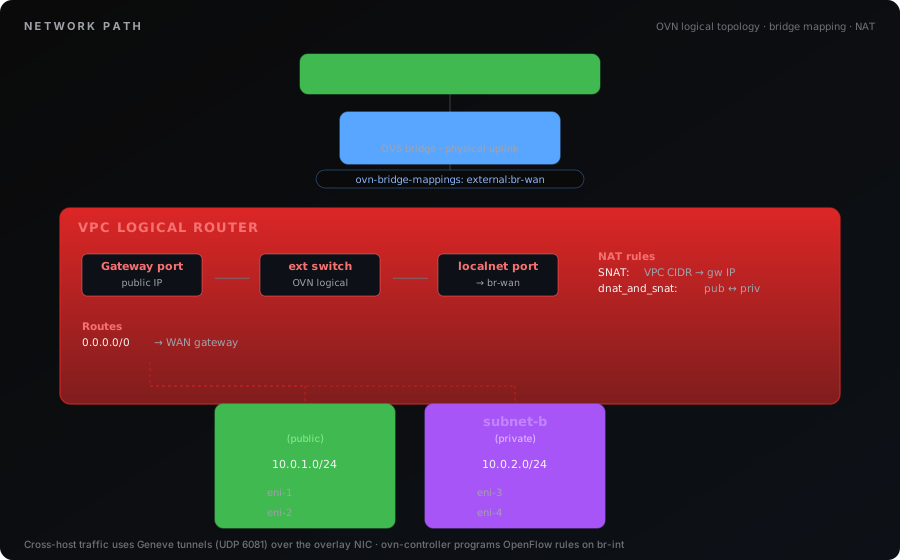
Cross-host traffic uses Geneve tunnels (UDP 6081) over the management/overlay NIC. Each host runs ovn-controller which programs OpenFlow rules on br-int (the integration bridge where all VM TAP devices connect).
Private vs Public Subnets
A subnet's behavior depends on three things: whether the VPC has an Internet Gateway, whether the subnet's route table has a default route to that IGW, and whether the subnet has MapPublicIpOnLaunch enabled.
Private Subnet (Default)
Instances get a private IP only. They can communicate with other instances in the same VPC (even across subnets and hosts via the overlay). They cannot reach the internet or be reached from the WAN.

Private subnet instances reach the internet only if their route table has a default route to the IGW (shared SNAT, outbound only — they share the gateway IP) or to a NAT gateway. With no default route, egress is dropped. Either way they cannot be reached from the WAN because they have no public IP.
Public Subnet
Instances get both a private IP and a public IP. The public IP is a 1:1 NAT managed by OVN — the instance OS only sees its private IP.

Requirements for a public subnet:
- VPC has an Internet Gateway attached
- A route table associated with the subnet has a
0.0.0.0/0route to the IGW - Subnet has
MapPublicIpOnLaunch = true - External IP pool configured in
spinifex.toml
Spinifex follows AWS route-table semantics: a subnet is only "public" if its effective route table carries a default route to the IGW. A new VPC's main route table has the local route only — Spinifex does not add the IGW route for you. Without it, the subnet's egress is gated with a drop policy, so instances cannot reach the internet (and inbound connections cannot complete because return traffic is dropped) even with a public IP and an attached IGW. Add the route explicitly — either to the main route table, or to a custom route table associated with the subnet (see Quick Start).
Comparison
| Private Subnet | Public Subnet | |
|---|---|---|
| Private IP | Yes | Yes |
| Public IP | No | Auto-assigned from pool |
| Outbound internet | Only with a default route to IGW/NAT GW | Yes (own public IP via SNAT) |
| Inbound from WAN | No | Yes (via 1:1 NAT to public IP) |
| Instance sees public IP? | N/A | No — only sees private IP |
| Elastic IP support | Only if explicitly associated | Yes |
External Connectivity Modes
The [network] section in spinifex.toml controls how VMs reach the outside world. There are three modes, and pool mode has two IP sources (static or DHCP).
pool — Full Public Networking (Recommended)
Each VM in a public subnet gets its own public IP with bidirectional 1:1 NAT. Supports the full AWS feature set: public subnets, auto-assign public IPs, Elastic IPs, and security groups.
Pool mode supports two ways to obtain public IPs:
Static Range (default)
The admin defines a range of routable IPs that Spinifex manages exclusively.
Use when: You have a block of IPs you control — datacenter ISP allocation, homelab range carved out of your router's DHCP scope, enterprise DMZ range.
Requirement: The IP range must NOT be served by any other DHCP server. In a homelab, shrink your router's DHCP scope to exclude the Spinifex range.
[network]
external_mode = "pool"

[[network.external_pools]]
name        = "wan"
range_start = "192.168.1.150"
range_end   = "192.168.1.250"
gateway     = "192.168.1.1"       # Router / next-hop IP
prefix_len  = 24
dns_servers = ["192.168.1.1", "8.8.8.8"]
DHCP Source
Instead of a static range, public IPs come from the upstream router's DHCP server. When a VM launches, Spinifex requests a DHCP lease from the router on behalf of the VM. When the VM terminates, the lease is released.
The VM itself never talks to the router's DHCP — it only sees its private VPC IP (from OVN's internal DHCP). The host-side DHCP conversation is invisible to the guest.
Use when: You don't control a static IP block but the router's DHCP server has enough leases. Homelabs where you don't want to carve out a range. Environments where IPs are managed centrally by the network team's DHCP.
Requirement: dhclient or dhcpcd-base installed on the host.
[network]
external_mode = "pool"

[[network.external_pools]]
name        = "wan"
source      = "dhcp"              # "static" (default) or "dhcp"
gateway     = "192.168.1.1"       # Router / next-hop IP
prefix_len  = 24
dns_servers = ["192.168.1.1", "8.8.8.8"]
# No range_start/range_end — IPs come from router DHCP
How Pool Mode Works (Both Sources)
Regardless of whether IPs come from a static range or DHCP, the OVN behavior is identical:
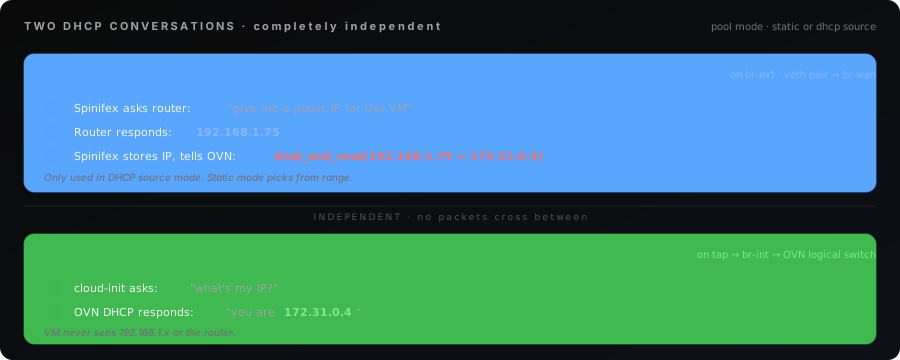
Choosing Static vs DHCP
| Static Range | DHCP Source | |
|---|---|---|
| Public IPs from | Admin-defined range_start..range_end | Router's DHCP server |
| IP predictability | You know the exact range | Router assigns whatever is available |
| Setup effort | Must reserve range, shrink router DHCP scope | Just set source = "dhcp" |
| Dependency | None | Requires dhclient on host, working router DHCP |
| Best for | Datacenters, ISP blocks, production | Homelabs, dev environments, shared networks |
| Capacity | Exact: range_end - range_start IPs | Limited by router's DHCP pool size |
Both support the same AWS features: public subnets, Elastic IPs, security groups, DescribeInstances showing public IPs.
nat — Shared SNAT (Simple)
All VMs share a single external IP for outbound SNAT. By default there are no public IPs, no Elastic IPs, and no inbound from WAN — all subnets behave as private subnets with internet access. On routed-NAT nodes, adding a public pool restores full public IP parity (see below).
Limitation (routed-NAT v1): System instances (ECS/EKS/load-balancer agents) source egress from ExternalIPAM pool IPs, which do not exist in
external_mode=nat. Those features requireexternal_mode=pool. A v2 will either allocate transit IPs for system instances or reject the feature at the API level in nat mode.
The gateway_ip is the IP that OVN uses for SNAT. You can set it statically or use setup-ovn.sh --dhcp to obtain one from the router. This is the router's DHCP — not Spinifex's internal OVN DHCP for VMs.
Use when: VMs only need outbound access (apt update, pulling images). Edge deployments behind ISP NAT. Single WAN IP available.
[network]
external_mode = "nat"

[[network.external_pools]]
name       = "wan"
gateway    = "192.168.1.1"
gateway_ip = "192.168.1.100"     # Single IP for all VM outbound SNAT
prefix_len = 24
Host access to instances (jumpbox pattern)
The spinifex host automatically reaches every instance's private IP: IGW attach installs a host route into OVN (<vpc-cidr> via <gateway-transit-ip> dev spx-nat-host) and exempts the transit net from SNAT, so replies to host-initiated connections come back un-NATted. No per-instance setup.
Security groups still apply and the default SG is closed to the host, same as AWS — open SSH/ICMP from the transit net first:
aws ec2 authorize-security-group-ingress --group-id $SG \
  --protocol tcp --port 22 --cidr 100.127.0.0/24
Then use the host as a jumpbox for remote access:
ssh -J admin@<spinifex-host> ubuntu@<instance-private-ip>Extra networks that must reach instances without SNAT (e.g. a management LAN) can be added via [network] nat_exempt_cidrs = ["192.168.50.0/24"].
Public IPs in NAT mode (public pool)
A routed-NAT node (setup-ovn.sh --nat-uplink + spx admin init --external-mode=nat) can carry a public pool alongside the internal nat-transit pool. With one configured, nat mode behaves like pool mode for public IPs: MapPublicIpOnLaunch on the default subnet, auto-assigned public IPs, and Elastic IPs all work. Spinifex delivers each public IP at the host — a /32 route steers it into OVN and a proxy-ARP neighbor entry answers for it on the uplink (L3 only, same MAC, so it works on WiFi and other non-bridgeable uplinks).
Static range carved out of the router's DHCP scope:
spx admin init --external-mode=nat \
  --external-pool 192.168.1.150-192.168.1.250 \
  --external-gateway 192.168.1.1
Or lease public IPs from the upstream router's DHCP:
spx admin init --external-mode=nat --external-source=dhcp \
  --external-bind-bridge wlan0
On WiFi/WWAN uplinks the leases are requested with the interface's own MAC (dhcp_mac = "interface", written automatically) and distinguished by DHCP client-id. Some routers key leases by MAC and ignore the client-id — Spinifex detects this (the router hands the same IP to two client-ids) and fails the allocation with advice to switch to a static range.
Resulting config:
[network]
external_mode = "nat"
bridge_mode   = "nat"

[[network.external_pools]]
name       = "nat-transit"        # internal transit net (auto-generated)
gateway    = "100.127.0.1"
prefix_len = 24

[[network.external_pools]]
name        = "wan"               # public pool
range_start = "192.168.1.150"
range_end   = "192.168.1.250"
gateway     = "192.168.1.1"
prefix_len  = 24
Caveat — reaching an EIP from the spinifex host itself. Host-sourced traffic enters OVN from the transit net, which is exempt from NAT (that is what makes the jumpbox pattern work) — so a host connection to an EIP that carries the transit source IP would skip DNAT. Spinifex stamps the EIP route with the uplink's LAN IP as source to avoid this, but if no uplink address can be determined, connect to the instance's private IP from the host instead. Other machines on the LAN are unaffected.
Disabled (Empty/Omitted)
VPC networking is overlay-only. No external connectivity. Instances can only communicate within their VPC.
Mode Comparison
| Capability | pool (static) | pool (dhcp) | nat | Disabled |
|---|---|---|---|---|
| Outbound internet | Yes | Yes | Yes | No |
| Host reaches instance private IPs | No | No | Yes (routed) | No |
| Inbound from WAN | Yes (1:1 NAT) | Yes (1:1 NAT) | With public pool | No |
| Public subnets | Yes | Yes | With public pool | No |
| Auto-assign public IPs | Yes | Yes | With public pool | No |
| Elastic IPs | Yes | Yes | With public pool | No |
| DescribeInstances shows public IP | Yes | Yes | With public pool | No |
| Admin must reserve IP range | Yes | No | Only static pool | No |
| Needs router DHCP | No | Yes | Optional | No |
If you start with nat and later need public subnets: on a bridgeable uplink switch to pool and define a range (or use source = "dhcp"); on a routed-NAT node just add a public pool alongside nat-transit — no data migration needed.
Bridge Setup — Physical Network Wiring
The WAN NIC must be enslaved to a Linux bridge. This is a hard requirement — setup-ovn.sh will not attach a physical NIC directly to OVS, and macvlan is no longer supported. The Linux bridge owns the host IP, default route, and any DHCP lease, so SSH and management traffic stay up while OVS/OVN are configured underneath.
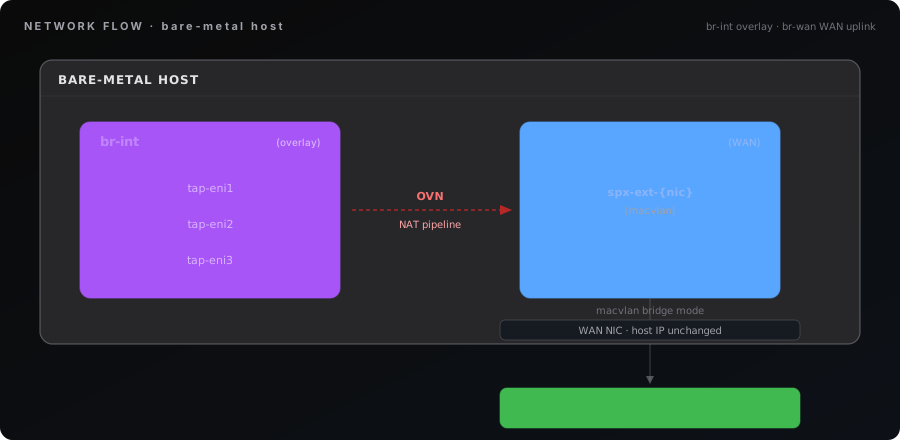
The full datapath chain looks like this:
physical NIC (e.g. `wan`)
   └─ enslaved to ─▶ br-wan         (Linux bridge — host IP, default route, DHCP)
                       │
                       └─ veth pair ─▶ br-ext   (OVS bridge — OVN external uplink)
                                          │
                                          └─ localnet ─▶ br-int  (OVS integration bridge)
                                                            │
                                                            └─▶ TAP devices  (VM NICs)
setup-ovn.sh auto-detects the Linux bridge that owns the default route (typically br-wan, provisioned by cloud-init / netplan / systemd-networkd). You can override the detection with --wan-bridge=<name>. Once detected, the script creates the OVS bridge br-ext and links it to the WAN bridge with a veth pair. The Linux bridge keeps its IP and routes — no interruption. Bridge-mapping is set to external:br-ext.
If the default route is on a bare physical NIC (no bridge), setup-ovn.sh stops and prints guidance on how to convert the NIC to a bridge before re-running.
Example: Required br-wan State
The host must have something resembling this before setup-ovn.sh is run:
7: br-wan: <BROADCAST,MULTICAST,UP,LOWER_UP> mtu 1500 qdisc noqueue state UP group default qlen 1000
    link/ether 26:df:3c:de:d0:c2 brd ff:ff:ff:ff:ff:ff
    inet 192.168.1.31/23 brd 192.168.1.255 scope global br-wan
       valid_lft forever preferred_lft forever
    inet6 fe80::24df:3cff:fede:d0c2/64 scope link proto kernel_ll
       valid_lft forever preferred_lft forever
The physical NIC (e.g. wan, eth0, eno1) is enslaved to br-wan and has no IP of its own — all L3 state lives on the bridge.
Example netplan that produces this:
network:
  version: 2
  ethernets:
    wan:
      dhcp4: false
  bridges:
    br-wan:
      interfaces: [wan]
      dhcp4: true
Three Bridges, Three Jobs
Every Spinifex node has three bridges in the datapath:
| Bridge | Type | Created By | Purpose | Ports |
|---|---|---|---|---|
br-wan | Linux bridge | Host (cloud-init / netplan) | Host WAN uplink — owns host IP and default route | Physical WAN NIC, veth peer |
br-ext | OVS bridge | setup-ovn.sh | OVN external uplink (localnet) | veth peer to br-wan |
br-int | OVS bridge | setup-ovn.sh | VM overlay traffic (Geneve tunnels) | VM TAP devices, tunnel ports |
br-wan is provisioned by your distro's network configuration (cloud-init, netplan, systemd-networkd, ifupdown). The name is configurable; br-wan is the convention. br-int and br-ext are always created by setup-ovn.sh.
The link between br-ext and the VM datapath is logical, not physical: OVN's localnet port type maps the logical external switch to br-ext via ovn-bridge-mappings. Frames egressing a VM travel TAP → br-int → OVN pipeline → br-ext → veth → br-wan → physical NIC → wire.

Running setup-ovn.sh
# Auto-detect the WAN bridge (recommended)
sudo setup-ovn.sh

# Explicitly specify the WAN bridge name
sudo setup-ovn.sh --wan-bridge=br-wan
In environments where the WAN IP comes from a router's DHCP server (homelab, small office), add --dhcp to obtain a gateway IP from the router automatically:
sudo setup-ovn.sh --dhcpThis requests an IP from the router's DHCP (e.g., 192.168.1.1 serving addresses on the LAN). This is not Spinifex's internal OVN DHCP that assigns private IPs to VMs — it's your network's existing DHCP server.
| Flags | Result |
|---|---|
| (no flags) | Auto-detect WAN bridge from default route, create br-int + br-ext |
--wan-bridge=<name> | Use the specified Linux bridge as the WAN uplink |
--dhcp | Obtain the OVN gateway IP from the router's DHCP |
If no Linux bridge owns the default route, setup-ovn.sh exits with guidance rather than silently breaking host connectivity.
OVN Control Plane on Multi-Node Clusters
How OVN is deployed depends on the size of the cluster, and this is the main reason three servers is the recommended minimum for a multi-server deployment.
| Cluster size | OVN databases | Tolerates |
|---|---|---|
| 1–2 servers | standalone, on the first node | nothing — that node is a single point of failure for the control plane |
| 3 or more | clustered (RAFT) across the first three nodes | loss of any one database node |
Servers beyond the third run the full set of Spinifex services, but do not join the OVN database cluster — they connect to it as clients. The quorum stays at three however large the cluster gets, which is what keeps control-plane write latency stable.
What a control-plane outage actually costs
Less than it sounds. ovn-controller has already programmed the forwarding rules into each host, so running instances keep full networking — east-west, north-south, NAT and security groups all continue to work with the databases down.
What stops is change. Creating a VPC, launching an instance, and updating a security group all need the control plane, because each has to write new logical topology before anything can program it.
So a standalone OVN deployment is a reasonable choice for a lab or a single-server install. It is a poor one for production, where the inability to launch an instance during an outage is usually as bad as the instances being down.
Clustering the databases
The three database nodes are set up with --db-cluster-local-addr, and nodes 2 and 3 additionally point at node 1 with --db-cluster-remote-addr. Compute nodes take --ovn-remote listing all three, so they survive any one of them failing. See Multi-Node Install for the exact commands in sequence.
A clustered database can only be created from scratch — the ovn-central package starts a standalone one on install, so the cluster setup passes --recreate-db to replace it. Confirm the result with:
sudo ovn-appctl -t /var/run/ovn/ovnnb_db.ctl cluster/status OVN_NorthboundThree servers should be listed with exactly one leader. A report of a standalone database means the cluster flags did not take.
Per-Node Configuration
Different nodes in a cluster can have different WAN bridges and NICs:
[nodes.node1.vpcd]
external_interface = "br-wan"

[nodes.node2.vpcd]
external_interface = "br-public"

[nodes.node3.vpcd]
external_interface = "br-wan"      # br-wan enslaving bond0
external_interface is the Linux bridge that owns the WAN uplink on this node — not the physical NIC. The physical NIC lives underneath the bridge. Each node runs setup-ovn.sh with its own WAN bridge name (or relies on auto-detection). OVN only requires ovn-bridge-mappings to point at br-ext.
Bridge Verification
# OVS bridges created by setup-ovn.sh
sudo ovs-vsctl br-exists br-int && echo "br-int OK" || echo "br-int MISSING"
sudo ovs-vsctl br-exists br-ext && echo "br-ext OK" || echo "br-ext MISSING"

# Linux WAN bridge owns the host IP and default route
ip -br addr show br-wan
ip route show default
# Default route's dev should be br-wan (or your WAN bridge name)

# br-ext should have one veth port linking it to br-wan
sudo ovs-vsctl list-ports br-ext
# Expect: a veth name (e.g. "veth-wan-ovs")

# Confirm the matching peer is enslaved to the Linux WAN bridge
sudo bridge link show | grep br-wan

# Bridge mappings must point at br-ext
sudo ovs-vsctl get Open_vSwitch . external-ids:ovn-bridge-mappings
# Output: "external:br-ext"

# Physical NIC is enslaved to br-wan (master should be br-wan)
ip -d link show wan
Network Flow Diagram
Configuration Reference
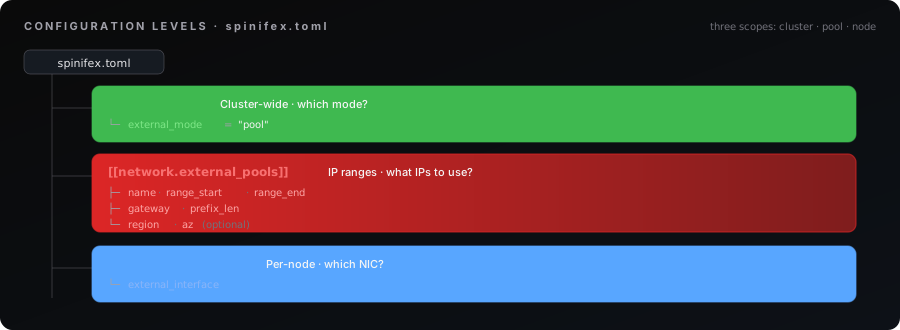
All network configuration lives in spinifex.toml. Settings are split into three levels: cluster-wide mode, IP pool definitions, and per-node NIC settings.
Configuration Levels
Cluster-Wide: external_mode
[network]
external_mode = "pool" # "pool", "nat", or "" (disabled)| Value | Behavior |
|---|---|
"pool" | Full public networking — public subnets, auto-assign, Elastic IPs |
"nat" | Outbound-only SNAT — all VMs share one external IP |
"" / omitted | Overlay-only — no external connectivity |
IP Pools: network.external_pools
Each pool defines where external IPs come from. You can have one pool (homelab) or many (multi-region datacenter).
[[network.external_pools]]
name        = "wan"                  # Pool identifier (unique within cluster)
source      = "static"              # "static" (default) or "dhcp"
range_start = "192.168.1.150"        # First allocatable IP (static source only)
range_end   = "192.168.1.250"        # Last allocatable IP (static source only)
gateway     = "192.168.1.1"          # WAN default gateway (next hop for 0.0.0.0/0)
gateway_ip  = ""                     # OVN router SNAT address (defaults to range_start)
prefix_len  = 24                     # Subnet mask length
region      = ""                     # Scope to region (optional)
az          = ""                     # Scope to AZ (optional)
dns_servers = ["8.8.8.8"]           # DNS for VMs (optional)
Field Details
| Field | Required | Description |
|---|---|---|
name | Yes | Unique pool name. Referenced by AllocateAddress to target a specific pool. |
source | No | IP source: "static" (default) uses range_start/range_end. "dhcp" obtains IPs from the router's DHCP server on each VM launch. |
range_start | Static only | First IP in the range. First IP is reserved for OVN gateway SNAT (unless gateway_ip overrides). |
range_end | Static only | Last IP in the range. |
gateway | Yes | Physical router/switch — the WAN default gateway. OVN sets 0.0.0.0/0 → gateway. |
gateway_ip | NAT mode | Static IP for OVN router SNAT. In pool mode, defaults to range_start (static) or first DHCP lease (dhcp). In NAT mode, this is the single external IP all VMs share. |
prefix_len | Yes | Subnet mask for the external network (e.g., 24 = /24). |
region | No | Scopes pool to a region. Instances in this region prefer this pool. |
az | No | Scopes pool to an AZ. More specific than region. |
dns_servers | No | DNS servers propagated to VMs via OVN DHCP. |
gw_lrp_range_start / gw_lrp_range_end | No | Reserve gateway-LRP IPs for per-VPC OVN routers. When unset, the allocator auto-derives the top 16 host IPs of the pool subnet (~15 concurrent VPCs). Widen to raise the concurrent-VPC ceiling — the nat-transit pool defaults to 100.127.0.16-100.127.0.254 (239 VPCs). Must not overlap range_start/range_end. |
Why range_start/range_end Instead of CIDR?
Customer IP ranges rarely align to CIDR boundaries. A datacenter might have 203.0.113.10-203.0.113.200 from their ISP. Start/end avoids forcing admins to calculate CIDR blocks.
Gateway vs Gateway_IP
These are different things:
gateway= Your network's default gateway (e.g., 192.168.1.1). This is where OVN sends packets destined for the internet. It's your router.gateway_ip= The IP that OVN uses for outbound SNAT. In pool mode, defaults to the first IP in the range. In NAT mode, set this explicitly. Must be on the same subnet as the gateway.
Per-Node: nodes.NAME.vpcd
[nodes.spx1.vpcd]
# Comma-separated list of the OVN NB/SB quorum endpoints (3 DB nodes). vpcd and
# ovn-controller fail over across them and follow the RAFT leader.
ovn_nb_addr        = "tcp:10.1.3.181:6641,tcp:10.1.3.182:6641,tcp:10.1.3.183:6641"
ovn_sb_addr        = "tcp:10.1.3.181:6642,tcp:10.1.3.182:6642,tcp:10.1.3.183:6642"
external_interface = "br-wan" # WAN Linux bridge name| Field | Description |
|---|---|
ovn_nb_addr / ovn_sb_addr | OVN Northbound / Southbound DB endpoint(s). The NB and SB databases run clustered via OVSDB RAFT across the first three nodes (client ports 6641/6642, RAFT ports 6643/6644). Each node's config lists all three quorum endpoints so the loss of one DB node does not stall the control plane. A single tcp:IP:6641 string remains valid for single-node dev. |
external_interface | Linux bridge that owns the WAN uplink on this node (e.g. br-wan, br-public). The physical NIC is enslaved to this bridge — not configured here. Different nodes may differ. |
Pool Selection Logic
When an instance needs a public IP:
- AZ-scoped pool first: Pool with matching
region+az - Region-scoped fallback: Pool with matching
region, noaz(overflow) - Unscoped fallback: Pool with no
region/az(global, homelab configs) - Exhausted: All pools full →
InsufficientAddressCapacityerror
AllocateAddress accepts optional pool name to target a specific block (maps to AWS PublicIpv4Pool).
IPAM Storage
Pool allocation state is stored durably in the cluster (NATS KV bucket spinifex-external-ipam, one entry per pool) and survives restarts. Each allocation records the ENI and instance holding the address. Pools are initialized from spinifex.toml on vpcd startup (idempotent).
Deployment Examples
Homelab / Dev (Single Pool)
Network: 192.168.1.0/24
Router: 192.168.1.1 (DHCP .2–.149)
Spinifex: 192.168.1.150–.250 (100 IPs)[network]
external_mode = "pool"
[[network.external_pools]]
name = "wan"
range_start = "192.168.1.150"
range_end = "192.168.1.250"
gateway = "192.168.1.1"
prefix_len = 24
[nodes.homelab.vpcd]
external_interface = "br-wan"Setup: Configure br-wan to enslave your physical WAN NIC (netplan, cloud-init, or systemd-networkd). Change your router's DHCP range to end at .149. Run sudo setup-ovn.sh — it auto-detects the WAN bridge from the default route, or specify it with --wan-bridge=br-wan.
Homelab / Dev (DHCP Pool — No Range Reservation)
Network: 192.168.1.0/24
Router: 192.168.1.1 (DHCP serves full range, no carve-out needed)
Spinifex: gets IPs from router DHCP on demand[network]
external_mode = "pool"
[[network.external_pools]]
name = "wan"
source = "dhcp"
gateway = "192.168.1.1"
prefix_len = 24
dns_servers = ["192.168.1.1", "8.8.8.8"]
[nodes.homelab.vpcd]
external_interface = "br-wan"Setup: No router changes needed. Spinifex requests IPs from the router's DHCP server when VMs launch and releases them on terminate. Requires dhclient on the host (apt install isc-dhcp-client).
Host-Local Subnet (No Upstream Router)
Network: 192.168.10.0/24 — host-local, reachable from the host only
Host WAN: 198.51.100.10/24 on br-wan (existing address — unchanged)
Gateway: 192.168.10.1 — second address added to br-wan
Add the VM pool gateway as a second address on br-wan alongside the existing WAN IP. The host acts as the gateway for the pool — no upstream router or DHCP server needed for this range.
# /etc/netplan/…
bridges:
  br-wan:
    addresses:
      - 192.168.10.1/24      # VM pool gateway — host-local
      - 198.51.100.10/24     # existing WAN IP — unchanged
    routes:
      - to: default
via: 198.51.100.1[network]
external_mode = "pool"
[[network.external_pools]]
name = "wan"
source = "static" # required — no upstream DHCP for this range
range_start = "192.168.10.2"
range_end = "192.168.10.100"
gateway = "192.168.10.1" # second address on br-wan
prefix_len = 24
dns_servers = ["8.8.8.8"]Setup: Apply with sudo netplan apply. VMs are reachable from the host at 192.168.10.x. For internet access through the host's WAN interface:
sysctl -w net.ipv4.ip_forward=1
iptables -t nat -A POSTROUTING -s 192.168.10.0/24 -o br-wan -j MASQUERADE
Persist via /etc/sysctl.d/99-ip-forward.conf and netfilter-persistent save.
Datacenter / Colo (ISP Block)
ISP-assigned: 203.0.113.0/28 (14 usable IPs)
ISP gateway: 203.0.113.1
Servers: 3x with separate mgmt NIC (eth0) and public NIC enslaved to br-wan[network]
external_mode = "pool"
[[network.external_pools]]
name = "public"
range_start = "203.0.113.2"
range_end = "203.0.113.14"
gateway = "203.0.113.1"
prefix_len = 28
[nodes.dc1.vpcd]
external_interface = "br-wan" # br-wan enslaves eth1
[nodes.dc2.vpcd]
external_interface = "br-wan" # br-wan enslaves eth1
[nodes.dc3.vpcd]
external_interface = "br-public" # br-public enslaves eno1Enterprise On-Prem (VLAN)
The Linux WAN bridge enslaves a VLAN sub-interface (e.g. eth1.200) instead of a raw NIC. From OVN's perspective nothing changes — external_interface still points at the bridge.
[network]
external_mode = "pool"

[[network.external_pools]]
name        = "dmz"
range_start = "172.16.0.100"
range_end   = "172.16.0.200"
gateway     = "172.16.0.1"
prefix_len  = 24

[nodes.srv1.vpcd]
external_interface = "br-dmz"      # br-dmz enslaves eth1.200

[nodes.srv2.vpcd]
external_interface = "br-dmz"      # br-dmz enslaves bond0.200
Edge / Branch (Outbound Only)
[network]
external_mode = "nat"

[[network.external_pools]]
name       = "wan"
gateway    = "10.0.0.1"
gateway_ip = "10.0.0.50"
prefix_len = 24

[nodes.edge1.vpcd]
external_interface = "br-wan"
Multi-Region (Multiple Pools)
[network]
external_mode = "pool"

# US East — AZ-scoped
[[network.external_pools]]
name        = "us-east-1a"
range_start = "203.0.113.2"
range_end   = "203.0.113.254"
gateway     = "203.0.113.1"
prefix_len  = 24
region      = "us-east-1"
az          = "us-east-1a"

# US East — overflow (any AZ in region)
[[network.external_pools]]
name        = "us-east-overflow"
range_start = "192.0.2.2"
range_end   = "192.0.3.254"
gateway     = "192.0.2.1"
prefix_len  = 23
region      = "us-east-1"

# EU West
[[network.external_pools]]
name        = "eu-west"
range_start = "213.189.1.2"
range_end   = "213.189.2.254"
gateway     = "213.189.1.1"
prefix_len  = 23
region = "eu-west-1"Spinifex allocates from the correct pool based on where the instance launches. An instance in us-east-1a gets an IP from us-east-1a first; if exhausted, falls back to us-east-overflow.
Security Groups
Security groups are stateful firewalls enforced at the OVS datapath level on each hypervisor. Traffic is filtered before it reaches the wire — equivalent to AWS Nitro card enforcement. The VM never sees dropped packets.
How Security Groups Work
Each security group maps to an OVN Port Group. When an instance launches, its ENI port is added to the port group(s) for its security groups. ACL rules on the port group control traffic:
- Default deny: All inbound traffic dropped at priority 900
- Allow rules: Specific ports/protocols allowed at priority 1000 (overrides deny)
- Stateful: All allow rules use
allow-related— return traffic is automatically permitted
Default Security Group
Every VPC gets a default security group that:
- Allows all inbound from instances in the same security group
- Allows all outbound
- Denies all other inbound
AWS Rule → OVN ACL Translation
| AWS Security Group Rule | OVN ACL Match |
|---|---|
| Ingress TCP/22 from 0.0.0.0/0 | outport == @sg && ip4 && tcp.dst == 22 |
| Ingress TCP/443 from 10.0.0.0/8 | outport == @sg && ip4 && tcp.dst == 443 && ip4.src == 10.0.0.0/8 |
| Ingress ALL from sg-other | outport == @sg && ip4 && ip4.src == $sg_other_ip4 |
| Ingress ICMP from anywhere | outport == @sg && ip4 && icmp4 |
| Egress ALL to 0.0.0.0/0 | inport == @sg && ip4 |
| Default deny inbound | outport == @sg && ip4 (priority 900, action=drop) |
Example: Allow SSH + HTTP
# Create security group
SG=$(aws ec2 create-security-group --group-name web \
  --description "Web servers" --vpc-id $VPC \
  --query GroupId --output text)

# Allow SSH from anywhere
aws ec2 authorize-security-group-ingress --group-id $SG \
  --protocol tcp --port 22 --cidr 0.0.0.0/0

# Allow HTTP from anywhere
aws ec2 authorize-security-group-ingress --group-id $SG \
  --protocol tcp --port 80 --cidr 0.0.0.0/0

# Launch instance with this SG
aws ec2 run-instances --image-id $AMI --instance-type t3.small \
  --subnet-id $SUBNET --security-group-ids $SG --key-name mykey
Rule changes take effect immediately — no instance restart needed.
Platform Default Egress Restrictions (Outbound SMTP)
Like AWS, Spinifex blocks outbound SMTP from instances by default so a compromised guest cannot turn a fresh account into a spam relay. Connections to the mail ports are dropped at the OVS datapath before they reach the wire:
| Port | Protocol | Purpose |
|---|---|---|
| 25 | TCP | SMTP relay |
| 465 | TCP | SMTP over implicit TLS |
| 587 | TCP | SMTP submission |
This is a platform default, not a security-group rule. It is enforced as an OVN egress ACL on every guest's port group at a priority above tenant SG allows, so a tenant cannot open these ports by adding a security-group rule — matching AWS, where lifting the block is an operator action, not a tenant one. Only public destinations are blocked; mail to private ranges (10/8, 172.16/12, 192.168/16, 100.64/10, link-local) is exempt, so an in-VPC or on-prem relay still works. Dropped attempts are logged for abuse triage.
It sits alongside the security-group ACLs and the host firewall (the nft policy that scopes the node's own ports) as a third datapath control — this one applies to guest egress specifically.
Operator controls (cluster-wide, in spinifex.toml):
[network]
# Omit for the default [25, 465, 587]; set [] to disable entirely.
blocked_ports_wan = [25, 465, 587]

# Workaround to let a specific tenant/VPC send mail, until per-account
# exceptions exist: list the VPC IDs to exempt from the block.
egress_block_exempt_vpcs = ["vpc-0abc123..."]
Exempting a VPC removes the block for all guests in that VPC, so scope it narrowly. Add every VPC ID you want exempt to the one list — egress_block_exempt_vpcs = ["vpc-a", "vpc-b", ...]; the match is by VPC ID, so one entry covers every security group in that VPC.
Multi-node clusters — keep the value identical on every node, and restart vpcd
[network] is a cluster-wide setting, but it physically lives in each node's own spinifex.toml, and there is no live distribution of it. Two properties of the current implementation make the operator responsible for consistency:
- One node writes the ACLs. SG reconcile runs on a single CAS-elected vpcd leader, which programs the shared OVN northbound DB. Whichever node holds the lease is the one whose
blocked_ports_wan/egress_block_exempt_vpcsis in force. Leadership moves on restart or crash, so if the node configs disagree, the effective policy changes when the leader changes and the drift pass flaps the ACLs between the two states. Edit the value identically on every node. - It is read at vpcd startup, not hot-reloaded. The policy is built once when vpcd starts; editing the TOML does nothing until vpcd restarts. Deploy the config change to all nodes and restart vpcd cluster-wide (take the target down and confirm no
spxprocess survives — a selective single-service restart is not reliable on the shared binary).
This is the current implementation and is deliberately minimal. A future revision will move the exemption into shared cluster state (so a single edit propagates and cannot drift between nodes) and make it a per-account control rather than a per-VPC operator edit; until then, the two rules above are load-bearing.
The Instance-to-Host Plane (Metadata and VPC DNS)
Security groups govern traffic between instances and to the outside. There is a third path they do not touch, and it is the one most easily left exposed: traffic from an instance to the host it runs on.
Every instance reaches two link-local addresses served by the hypervisor:
| Address | Service | Port |
|---|---|---|
169.254.169.254 | Instance metadata (IMDS) — cloud-init, instance-role credentials | TCP 80 |
169.254.169.253 | VPC DNS resolver | UDP/TCP 53 |
These are not guest addresses and not OVN routed. Each instance's tap has a capture rule on the hypervisor that intercepts any packet addressed to .254 or .253 and delivers it to a per-ENI internal port in the host network namespace (named ime-*). That interception is by destination address only — it does not match the port. A packet to 169.254.169.254:22 is delivered to the host just as readily as one to 169.254.169.254:80.
That matters because host services — SSH, the AWS gateway on 9999, the console on 3000, the DNS server — bind the wildcard address, so they also answer on these link-local addresses. Without a control on the ime-* path, an instance can reach every one of them, with none of the source scoping that protects the same services on the network. A resolver query sent straight to the host's DNS port this way also bypasses the per-instance DNS rate limit.
This plane is invisible to a network firewall
The critical point for anyone securing a deployment: this traffic never crosses the physical NIC. It is intra-host, on the OVS bridge between the instance's tap and the ime-* port. A cloud security group, an upstream firewall, ufw, or any rule written against the WAN interface is not in this path and cannot filter it. The only place to enforce it is on the ime-* interface in the host itself.
How it is protected
Spinifex's host firewall carries a rule that scopes the ime-* path to exactly the two legitimate endpoints and ports — IMDS on .254:80, DNS on .253:53 — and drops everything else. Whether you have that rule depends entirely on whether the host firewall is on:
| Install path | Host firewall | This plane |
|---|---|---|
| From the ISO | on | protected |
Binary installer (curl | bash) or setup.sh | off | exposed |
Binary installer with --firewall=on | on | protected |
The ISO ships the firewall armed, so ISO deployments are protected out of the box. The binary installer ships it off — deliberately, because it runs on servers that may already have services the installer knows nothing about, and a default-deny policy could cut them off. The consequence is that a binary install left at its default has this plane wide open, and so does every host service on the WAN besides.
If you install any way other than the ISO, turn the host firewall on. At install time:
curl -fsSL https://install.mulgadc.com | bash -s -- --firewall=on
# or, from a source checkout:
sudo /usr/local/share/spinifex/setup.sh --firewall=on
or afterwards, in /etc/spinifex/spinifex.toml, followed by a daemon restart:
[network]
firewall_enabled = true
Before enabling it, check what else the machine is serving — anything listening outside the public port group stops accepting new connections. See Host Firewall for the full port policy and the cluster-formation steps.
Verifying it
On the hypervisor, the ime-* accept should be scoped, not blanket:
sudo nft list chain inet spinifex_filter input | grep ime
# Expect three rules naming 169.254.169.254 tcp dport 80 and 169.254.169.253
# udp/tcp dport 53 — not a bare `iifname "ime-*" accept`.
From an instance, the two service ports work and nothing else does:
curl -s -o /dev/null -w '%{http_code}\n' http://169.254.169.254/latest/meta-data/   # 401 (IMDSv2)
dig +short @169.254.169.253 example.com A                                            # resolves
nc -vz 169.254.169.254 22                                                            # must fail
A missing spinifex_filter table means the host firewall is off and this plane is unprotected regardless of the rule above.
Elastic IPs
Elastic IPs are static public IPs that persist across instance stop/start cycles. Unlike auto-assigned public IPs (which change on stop/start), an Elastic IP stays with your instance.
# Allocate
EIP=$(aws ec2 allocate-address --query AllocationId --output text)

# Associate with instance
aws ec2 associate-address --allocation-id $EIP --instance-id $INSTANCE

# Stop/start instance — same Elastic IP

# Disassociate
aws ec2 disassociate-address --association-id $ASSOC_ID

# Release back to pool
aws ec2 release-address --allocation-id $EIP
When you associate an Elastic IP with an instance that already has an auto-assigned public IP, the auto-assigned IP is released and replaced.
OVN Reference
For operators debugging or verifying the OVN topology.
IGW Attach Creates
# External logical switch with localnet port
ovn-nbctl ls-add ext-{vpcId}
ovn-nbctl lsp-add ext-{vpcId} ext-localnet-{vpcId}
ovn-nbctl lsp-set-type ext-localnet-{vpcId} localnet
ovn-nbctl lsp-set-addresses ext-localnet-{vpcId} unknown
ovn-nbctl lsp-set-options ext-localnet-{vpcId} network_name=external

# Gateway router port with real external IP
ovn-nbctl lrp-add vpc-{vpcId} gw-{vpcId} {mac} 192.168.1.150/24

# Connect external switch to router
ovn-nbctl lsp-add ext-{vpcId} ext-rtr-{vpcId}
ovn-nbctl lsp-set-type ext-rtr-{vpcId} router
ovn-nbctl lsp-set-options ext-rtr-{vpcId} router-port=gw-{vpcId}

# Gateway chassis HA
ovn-nbctl lrp-set-gateway-chassis gw-{vpcId} chassis-1 20
ovn-nbctl lrp-set-gateway-chassis gw-{vpcId} chassis-2 15

# SNAT for all VPC traffic
ovn-nbctl lr-nat-add vpc-{vpcId} snat 192.168.1.150 10.0.0.0/16

# Default route to WAN
ovn-nbctl lr-route-add vpc-{vpcId} 0.0.0.0/0 192.168.1.1
Per-Instance Public IP
# 1:1 NAT — distributed (DNAT processed on the VM's own chassis)
ovn-nbctl lr-nat-add vpc-{vpcId} dnat_and_snat {public_ip} {private_ip} \
  port-{eniId} {vm_mac}
With the WAN NIC on a Linux bridge wired to OVS via veth, OVS sees every frame on the wire regardless of MAC, so OVN can use distributed NAT. The DNAT is processed on the chassis hosting the VM rather than hairpinning through a single gateway chassis.
Security Group
# Create port group
ovn-nbctl pg-add sg-{groupId}

# Add VM ports
ovn-nbctl pg-set-ports sg-{groupId} port-{eniId1} port-{eniId2}

# Allow SSH inbound (stateful)
ovn-nbctl acl-add sg-{groupId} to-lport 1000 \
  'outport == @sg_{groupId} && ip4 && tcp.dst == 22' allow-related

# Allow all egress
ovn-nbctl acl-add sg-{groupId} from-lport 1000 \
  'inport == @sg_{groupId} && ip4' allow-related

# Default deny inbound
ovn-nbctl acl-add sg-{groupId} to-lport 900 \
  'outport == @sg_{groupId} && ip4' drop
Useful Debug Commands
# List all logical routers (VPCs)
sudo ovn-nbctl lr-list

# List all logical switches (subnets + external)
sudo ovn-nbctl ls-list

# Show NAT rules for a VPC
sudo ovn-nbctl lr-nat-list vpc-{vpcId}

# Show routes for a VPC
sudo ovn-nbctl lr-route-list vpc-{vpcId}

# Show chassis (nodes) in the cluster
sudo ovn-sbctl show

# Show port bindings (which VM is on which host)
sudo ovn-sbctl find Port_Binding type="" | grep -E "logical_port|chassis"

# Check ACLs on a security group
sudo ovn-nbctl acl-list sg-{groupId}

# Check port group membership
sudo ovn-nbctl pg-get-ports sg-{groupId}
Quick Start
1. Set Up OVN Bridges
Make sure the WAN NIC is enslaved to a Linux bridge (e.g. br-wan) and that bridge owns the default route. Then run:
sudo setup-ovn.sh                       # auto-detect WAN bridge
# or
sudo setup-ovn.sh --wan-bridge=br-wan   # explicit
2. Configure External IP Pool
spx admin init
# Follow prompts — auto-detects NICs, suggests IP pool range
# Or edit spinifex.toml manually
3. Create VPC with Public Subnet
VPC=$(aws ec2 create-vpc --cidr-block 10.200.0.0/16 \
  --query Vpc.VpcId --output text)

IGW=$(aws ec2 create-internet-gateway \
  --query InternetGateway.InternetGatewayId --output text)
aws ec2 attach-internet-gateway \
  --internet-gateway-id $IGW --vpc-id $VPC

SUBNET=$(aws ec2 create-subnet --vpc-id $VPC \
  --cidr-block 10.200.1.0/24 \
  --query Subnet.SubnetId --output text)

# Route table — give the subnet a default route to the IGW. Spinifex does NOT
# add this automatically; without it the subnet's egress is dropped.
RT=$(aws ec2 create-route-table --vpc-id $VPC \
  --query RouteTable.RouteTableId --output text)

aws ec2 create-route --route-table-id $RT \
  --destination-cidr-block 0.0.0.0/0 --gateway-id $IGW

aws ec2 associate-route-table --route-table-id $RT --subnet-id $SUBNET

# Auto-assign a public IP to instances launched into the subnet
aws ec2 modify-subnet-attribute \
  --subnet-id $SUBNET --map-public-ip-on-launch

# Allow SSH + ICMP on the VPC's default security group (blocks inbound by default)
SG=$(aws ec2 describe-security-groups \
  --filters Name=vpc-id,Values=$VPC \
  --query 'SecurityGroups[0].GroupId' --output text)

aws ec2 authorize-security-group-ingress --group-id $SG \
  --protocol tcp --port 22 --cidr 0.0.0.0/0

aws ec2 authorize-security-group-ingress --group-id $SG \
--protocol icmp --port -1 --cidr 0.0.0.0/04. Launch Instance
INSTANCE=$(aws ec2 run-instances \
  --image-id $AMI --instance-type t3.small \
  --subnet-id $SUBNET --key-name mykey \
  --query Instances[0].InstanceId --output text)

aws ec2 describe-instances --instance-ids $INSTANCE \
  --query 'Reservations[0].Instances[0].[PrivateIpAddress,PublicIpAddress]'
Troubleshooting
Debugging Toolkit
These commands are used throughout the troubleshooting sections below. Learn them — they cover 90% of VPC networking issues.
OVN Northbound (Logical Topology)
# Full topology overview (routers, switches, ports)
sudo ovn-nbctl show

# List all VPC routers
sudo ovn-nbctl lr-list

# List all switches (subnets + external)
sudo ovn-nbctl ls-list

# NAT rules for a VPC
sudo ovn-nbctl lr-nat-list vpc-{vpcId}

# Routes for a VPC
sudo ovn-nbctl lr-route-list vpc-{vpcId}

# Port details (check "up" field for DHCP status)
sudo ovn-nbctl list Logical_Switch_Port port-eni-{eniId}

# Gateway chassis assignment
sudo ovn-nbctl list Logical_Router_Port gw-vpc-{vpcId}

# Localnet port options (network_name should be "external")
sudo ovn-nbctl get Logical_Switch_Port ext-port-vpc-{vpcId} options
OVN Southbound (runtime state)
# Chassis list + port bindings (which VM is on which host)
sudo ovn-sbctl show

# Detailed chassis info (check name matches expectations)
sudo ovn-sbctl list Chassis

# MAC binding table (shows ARP resolution for external traffic)
sudo ovn-sbctl list MAC_Binding

# Trace a packet through the OVN pipeline (invaluable for debugging)
sudo ovn-trace ext-vpc-{vpcId} \
  'inport=="ext-port-vpc-{vpcId}" && eth.dst==ff:ff:ff:ff:ff:ff && \
   arp.op==1 && arp.spa==192.168.1.13 && arp.tpa==192.168.1.201'
OVN DB RAFT cluster (NB/SB replication)
The NB and SB databases run clustered across the first three nodes via native OVSDB RAFT. A 3-node quorum tolerates the loss of one DB node; check status when the control plane stalls.
# NB cluster status: expect 3 servers and exactly one "Role: leader"
sudo ovn-appctl -t /var/run/ovn/ovnnb_db.ctl cluster/status OVN_Northbound

# SB cluster status
sudo ovn-appctl -t /var/run/ovn/ovnsb_db.ctl cluster/status OVN_Southbound

# Drive a CLI at the whole quorum (fails over past a dead node)
sudo ovn-nbctl --db=tcp:10.1.3.181:6641,tcp:10.1.3.182:6641,tcp:10.1.3.183:6641 show
A node showing only itself under Servers: never joined the cluster — confirm it was bootstrapped with --db-cluster-remote-addr pointing at the creator and that RAFT ports 6643/6644 are reachable between DB nodes.
OVS (datapath / physical wiring)
# Full bridge + port topology
sudo ovs-vsctl show

# Kernel datapath ports and stats
sudo ovs-dpctl show

# Kernel datapath flow cache (actual forwarding rules)
sudo ovs-dpctl dump-flows

# OpenFlow rules installed by ovn-controller
sudo ovs-ofctl dump-flows br-int | grep {pattern}

# Conntrack entries (shows active NAT sessions)
sudo ovs-appctl dpctl/dump-conntrack | grep {ip}

# FDB (MAC address table) for a bridge
sudo ovs-appctl fdb/show br-wan

# OVS external_ids (system-id, bridge-mappings, encap-ip)
sudo ovs-vsctl get Open_vSwitch . external_ids
Network Interfaces
# Physical NIC should be enslaved to br-wan ("master br-wan")
ip -d link show {nic}

# Linux WAN bridge — owns the host IP and default route
ip -br addr show br-wan
ip route show default

# OVS bridges and the veth linking br-ext to br-wan
sudo ovs-vsctl list-ports br-ext
bridge link show | grep br-wan

# Interface traffic stats (RX/TX counts, drops)
ip -s link show {nic}
ip -s link show br-wan
Packet Capture
# Capture on the OVS uplink bridge (frames between OVN and br-wan)
sudo tcpdump -i br-ext -n -e arp

# Capture on the Linux WAN bridge (frames between br-ext veth and the NIC)
sudo tcpdump -i br-wan -n -e "host {public_ip}"

# Capture on the physical NIC (sees everything on the wire)
sudo tcpdump -i {nic} -n "host {public_ip}"
Service Logs
# vpcd log (reconcile, NAT, topology operations)
journalctl -u spinifex-vpcd -f

# ovn-controller log (port binding, commit failures)
sudo cat /var/log/ovn/ovn-controller.log | tail -50

# Daemon log (instance launch, network setup)
journalctl -u spinifex-daemon -f
VPC Creation Fails
Check OVN services and vpcd daemon:
sudo systemctl is-active ovn-controller
journalctl -u spinifex-vpcd -f
Instances Cannot Reach Each Other
Geneve tunnels may not be established:
sudo ovs-vsctl show | grep -i geneve
sudo ss -ulnp | grep 6081
From inside a VM:
ip addr show
ip route show
Instance Has No Public IP
- Check subnet has
MapPublicIpOnLaunch:
``bash aws ec2 describe-subnets --subnet-ids $SUBNET \ --query 'Subnets[0].MapPublicIpOnLaunch' ``
- Check IGW is attached:
``bash aws ec2 describe-internet-gateways \ --filters Name=attachment.vpc-id,Values=$VPC ``
- Check external IP pool:
``bash nats kv get spinifex-external-ipam wan ``
- Check OVN NAT rules:
``bash sudo ovn-nbctl lr-nat-list vpc-$VPC ``
Instance Has Public IP But No Internet
The instance shows a public IP in describe-instances but cannot reach the internet, and inbound connections hang. The usual cause is a missing default route: the subnet's effective route table has no 0.0.0.0/0 route to the IGW, so Spinifex gates the subnet with a drop policy.
# Find the route table that applies to the subnet and check its routes
aws ec2 describe-route-tables \
  --filters Name=association.subnet-id,Values=$SUBNET \
  --query 'RouteTables[0].Routes'
# Expect a route with DestinationCidrBlock 0.0.0.0/0 and a GatewayId of igw-...
If the subnet has no explicit association it falls back to the VPC's main route table — check that one too, then add the route to whichever table applies:
aws ec2 create-route --route-table-id $RT \
  --destination-cidr-block 0.0.0.0/0 --gateway-id $IGW
On the host, the drop policy installed when a subnet lacks an IGW route appears as a Logical_Router_Policy on the VPC router:
sudo ovn-nbctl lr-policy-list vpc-$VPC
# A drop policy matching the subnet CIDR means the subnet is gated.
Public IP Not Reachable from WAN
Work through these checks in order — each eliminates a class of issues.
1. Verify OVS wiring
# br-int and br-ext must exist
sudo ovs-vsctl show | grep -E "Bridge (br-int|br-ext)"

# br-ext should have a veth port linking it to br-wan
sudo ovs-vsctl list-ports br-ext

# The Linux WAN bridge should have the physical NIC and the veth peer
bridge link show | grep br-wan

# Bridge mappings must point at br-ext
sudo ovs-vsctl get Open_vSwitch . external-ids:ovn-bridge-mappings
# Expected: "external:br-ext"
2. Verify chassis and gateway scheduling
# What OVS thinks the chassis name is
sudo ovs-vsctl get Open_vSwitch . external-ids:system-id

# What OVN SB registered (must match the system-id above)
sudo ovn-sbctl show
# Look for: Chassis {name}

# What vpcd scheduled as gateway chassis (must match SB chassis name)
sudo ovn-nbctl list Logical_Router_Port gw-vpc-{vpcId} | grep gateway_chassis
If these don't match, see "Chassis name mismatch" below.
3. Verify NAT rule
sudo ovn-nbctl lr-nat-list vpc-$VPC | grep dnat_and_snat
# Must show the public IP → private IP mapping
# For distributed NAT, external_mac and logical_port should be set
# (the VM's MAC and ENI port name)
4. Verify ARP resolution
From another host on the same LAN, check if OVN responds to ARP:
# On the remote host:
ping -c 1 {public_ip}
ip neigh show {public_ip}
# Should show the VM's ENI MAC (distributed NAT) or the OVN router MAC
If ARP fails, confirm the WAN bridge is forwarding:
# Physical NIC must be enslaved to br-wan
ip -d link show {nic} | grep "master br-wan"

# br-wan must be UP and have an IP
ip -br addr show br-wan

# br-ext must have a veth port whose peer is enslaved to br-wan
sudo ovs-vsctl list-ports br-ext
bridge link show | grep br-wan
5. Verify packet flow with tcpdump
Capture at each layer to find where packets stop:
# Layer 1: Does the ARP/ICMP arrive on the physical NIC?
sudo tcpdump -i {nic} -n "host {public_ip}"

# Layer 2: Does it cross the Linux WAN bridge?
sudo tcpdump -i br-wan -n "host {public_ip}"

# Layer 3: Does it reach the OVS uplink bridge?
sudo tcpdump -i br-ext -n -e "host {public_ip}"
If traffic arrives on the physical NIC but not br-wan, the NIC is not enslaved to the bridge. If it reaches br-wan but not br-ext, the veth pair between them is missing or down — re-run setup-ovn.sh.
6. Use ovn-trace for pipeline debugging
Simulate a packet through the entire OVN pipeline:
sudo ovn-trace --ct=new ext-vpc-{vpcId} \
  'inport=="ext-port-vpc-{vpcId}" && eth.dst==ff:ff:ff:ff:ff:ff && \
   arp.op==1 && arp.sha=={remote_mac} && arp.spa=={remote_ip} && \
   arp.tpa=={public_ip}'
The output shows every table the packet passes through and what action is taken. Look for drop actions or unexpected paths.
OVN SB Commit Failure Loop
Symptom: ovn-controller log shows:
OVNSB commit failed, force recompute next time.Repeated millions of times. Port binding never happens (up: false).
Cause: Stale entries in the OVN Southbound DB (old chassis records, port bindings, datapath bindings) conflict with ovn-controller's expected state, typically after an ungraceful shutdown.
Fix: Delete both OVN DB files and restart:
sudo systemctl stop ovn-central ovn-controller
sudo rm -f /var/lib/ovn/ovnnb_db.db /var/lib/ovn/ovnsb_db.db
sudo systemctl start ovn-central ovn-controller
# vpcd reconcile will recreate the NB topology on next startup
WAN NIC Not Enslaved to a Bridge
Symptom: setup-ovn.sh exits with an error like "default route is on a physical NIC, not a bridge" and refuses to continue.
Cause: Spinifex requires the WAN NIC to be enslaved to a Linux bridge (typically br-wan). Macvlan is no longer supported, and attaching the NIC directly to OVS would break SSH and any other host services using the NIC.
Fix: Move the host IP and default route onto a Linux bridge. Example netplan:
network:
  version: 2
  ethernets:
    wan:
      dhcp4: false
  bridges:
    br-wan:
      interfaces: [wan]
      dhcp4: true
Apply (sudo netplan apply), confirm the host IP is now on br-wan (ip -br addr show br-wan), and re-run setup-ovn.sh.
Stale ARP on Remote Hosts
Symptom: Ping from a LAN host to a VM public IP fails after a reset, but worked before. The remote host has a stale ARP entry with the old MAC.
Fix: Flush the ARP entry on the remote host:
# On the remote host:
sudo ip neigh flush dev {nic} {public_ip}
ping {public_ip}   # should work now
OVN sends periodic gratuitous ARPs from the chassis hosting the VM that will eventually update remote ARP caches, but flushing is faster for testing.
Security Group Rules Not Taking Effect
# Check port is in correct port group
sudo ovn-nbctl pg-get-ports sg-$SG_ID

# Check ACLs
sudo ovn-nbctl acl-list sg-$SG_ID