OCI Architecture
How Spinifex is wired on OCI: both VNICs, the iSCSI data volume and the public-address allocator, with the IAM policy, the quotas and the troubleshooting.
Overview
Why run Spinifex on OCI
Lower cost for the same shape of workload. OCI prices compute and block storage well below the large US clouds for equivalent OCPU and IOPS, and Spinifex turns one large instance into a whole EC2/EBS/S3 surface. A tenant's twenty small instances become twenty QEMU guests on hardware you are billed for once, instead of twenty billable cloud instances.
Egress stops being the line item that decides the architecture. Oracle publishes a large monthly outbound-transfer allowance per tenancy, then charges per GB beyond it at roughly an order of magnitude below the majors. Check the current pricing page rather than a number in a document, but that gap is the reason this integration exists. Traffic _between_ guests never leaves the host, or on a cluster never leaves the VCN: it is Geneve over the private plane, which is not billed as internet egress at all.
The workload stops being AWS-shaped and becomes yours. Your tenants code against Spinifex's API, so one set of Terraform, SDK calls and AMIs runs on OCI today and on bare metal in your own rack whenever you decide to move it. Leaving AWS becomes a deployment decision rather than a rewrite, and the second move costs nothing extra.
You keep the parts of OCI worth keeping. Bare-metal shapes, fault domains, block volumes with a chosen performance tier, and real public addresses out of OCI's own pool. Spinifex registers each guest's address with OCI rather than hiding the cloud underneath it, so the guest is genuinely reachable on the internet instead of sitting behind a shared NAT.
Sizing
Bare metal is the recommendation. BM.Standard.E2.64 or similar gives you the hardware directly, with no nested virtualisation, full NIC performance, and nothing between your guests and the wire. Where bare metal is out of scope, a single VM.Standard.E6.Flex suits testing and development, or three of them production.
| Minimum | Recommended | |
|---|---|---|
| Shape | VM.Standard.E6.Flex | Bare metal, e.g. BM.Standard.E2.64 |
| OCPU | 8 (16 vCPU) | 32+ |
| RAM | 32 GB | 128 GB+ |
| Data volume | 256 GiB block volume | 1 TB+ NVMe-backed |
| VNICs | 2 | 2 |
| Nodes | 1 | 3, see Cluster sizing |
How it fits together
Everything in Single-Node Install and Multi-Node Install still applies: formation, storage and OVN behave exactly as they do on hardware you own. The layer underneath is what changes. An OCI VCN is not an Ethernet segment, so the external datapath is wired differently, and public addresses come from OCI's API rather than from a range you write in a config file.
Single node: the whole AWS surface inside one OCI instance
One instance runs the control plane and every tenant guest. Customers reach the AWS APIs on the node's own address, while their instances reach the internet through addresses registered on the node's second VNIC.
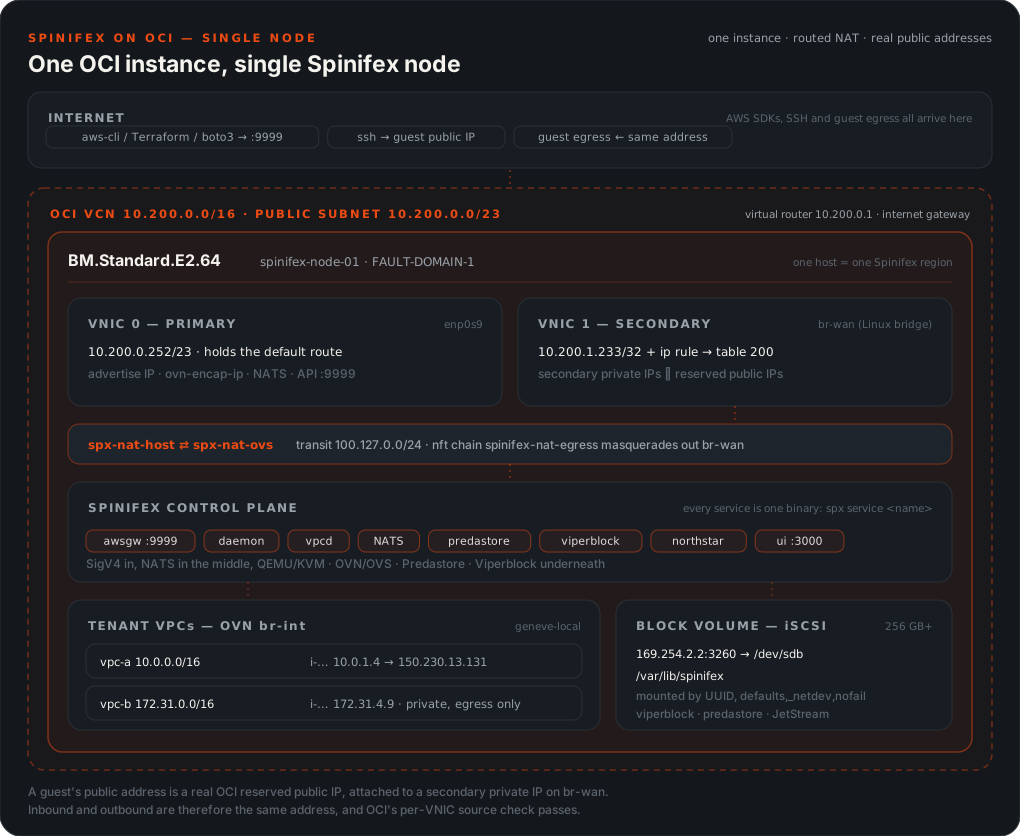
Two things in that picture are the whole integration. The guest's private address (10.0.1.4) never leaves the host, because OVN and the host route both hold it. The address OCI delivers to is a secondary private IP registered on VNIC 1, appearing on br-wan, and the customer's public address (150.230.13.131) is a reserved public IP that OCI 1:1-NATs onto it upstream. describe-instances reports the public one while every datapath object holds the private one, which is why the two never appear together on the host.
The third is storage. Every guest disk, every S3 object and the JetStream state all live under /var/lib/spinifex, which is an OCI block volume attached over iSCSI, not the boot disk. Size it for the guests you intend to run. A boot volume that quietly ends up carrying the stack is the most common way an install on OCI fails later rather than immediately.
Three nodes: the same surface, distributed
Each node registers the addresses for its own guests on its own second VNIC, and the allocator runs per node, so nothing has to know another node's OCIDs. When a guest moves, whether through a stop/start that lands elsewhere or a host failure, the node it lands on claims the address's private half from the old VNIC with a single OCI call. The OCID and the public half are untouched, so the customer's address never changes.
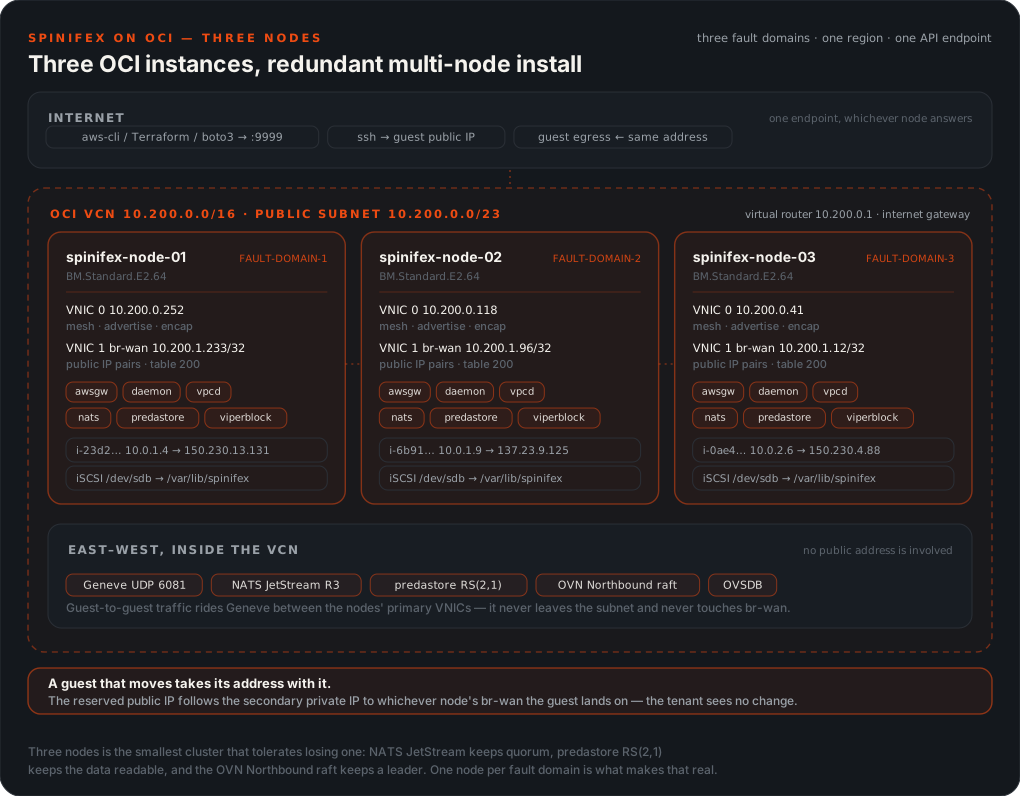
The overlay, the object shards and the OVN databases all cross VNIC 0, inside the VCN. Size that plane rather than the external one: guest-to-guest traffic between nodes is Geneve over the VCN, and it is the link every distributed layer shares.
The Spinifex region is your own naming and has nothing to do with the OCI region. ap-southeast-2 in spinifex.toml beside ap-sydney-1 in OCI is correct and expected. Do not read one as evidence about the other.
Credentials: an API key, or an instance principal
The allocator needs OCI credentials at runtime. A node with none forms, passes every health check, and then refuses every launch that wants a public address with InsufficientAddressCapacity, naming no cause outside its own journal.
An API key, the documented path
An API key needs nothing from a tenancy admin, which also makes it the only option when the compartment belongs to someone else's tenancy. The cost is key material on disk, with a rotation obligation, on every node:
# On your workstation, not the node.
openssl genrsa -out ~/.oci/oci_api_key.pem 2048
chmod 600 ~/.oci/oci_api_key.pem
openssl rsa -pubout -in ~/.oci/oci_api_key.pem -out ~/.oci/oci_api_key_public.pem
openssl rsa -pubout -outform DER -in ~/.oci/oci_api_key.pem \
  | openssl md5 -c        # this is the fingerprint
Upload the public key to the user under Identity → Users → API Keys, and record the user OCID, the fingerprint and the tenancy OCID.
Each node then needs two files, and a node holding only the key is the silent failure described above.
| Path | Mode | Contents |
|---|---|---|
/etc/spinifex/oci/oci_api_key.pem | 0640 root:spinifex | The private key |
/etc/spinifex/oci/config | 0640 root:spinifex | An ordinary OCI SDK config, profile [spinifex], naming the key by path |
The profile name must be spinifex to match oci_config_profile in the pool:
[spinifex]
user=ocid1.user.oc1..aaaa...
fingerprint=12:34:56:78:90:ab:cd:ef:12:34:56:78:90:ab:cd:ef
tenancy=ocid1.tenancy.oc1..aaaa...
region=ap-sydney-1
key_file=/etc/spinifex/oci/oci_api_key.pem
spx-oci-config.sh writes both files on every node, and the deploy calls it for you. It runs after formation and before the pool is configured, which is the only window where a node has /etc/spinifex but has not started the allocator, and it reads the credential from your [spinifex] profile, a dedicated key, a set of OCI_SPX_* environment variables, or failing all three the credential Terraform itself used — resolved through the same scripts/oci_env.py as the apply, so the two cannot disagree.
The key reaches the nodes over SSH and goes nowhere else. It is never rendered into user-data or Terraform state, where it would be readable from instance metadata for the life of the instance, and it is carried in the remote shell's stdin rather than its arguments, where ps would expose it to every other tenant on the host. --credential-hook PATH still takes any executable called as hook <ssh-key> <host>..., so a tenancy that keeps credentials in a vault can substitute its own.
An instance principal: no key material, but it needs a tenancy admin
The instance certificate is served at /opc/v2/identity/cert.pem and the Go SDK authenticates as the instance with no key on disk. It must also be _authorised_, by a dynamic group and a policy, and both are tenancy-root resources: oci_identity_dynamic_group is created with compartment_id set to the tenancy OCID. A compartment-scoped user cannot create them, and the attempt fails with 404-NotAuthorizedOrNotFound on CreateDynamicGroup, which reads like a misconfiguration and is not one.
cd scripts/terraform/oci-spx
./setup-identity.sh --dry-run     # always first
./setup-identity.sh               # needs a tenancy-admin OCI profile
Then set instance_principal = "adopt" in your tfvars and pass --instance-principal to the deploy instead of --credential-hook. The dynamic group matches on instance.compartment.id, so it covers every node you ever build in that compartment and nothing needs updating when nodes are replaced.
The IAM policy
Spinifex calls exactly ten operations, all of them in spinifex/providers/cloud/oci/client.go. Grant no more than these:
| Operation | Why |
|---|---|
CreatePrivateIp | Register the secondary private IP the datapath carries |
DeletePrivateIp | Release it |
GetPrivateIp | Poll for AVAILABLE after an asynchronous assign |
ListPrivateIps | The startup reconcile, and the affinity pass that moves an address between nodes |
UpdatePrivateIp | Reassign a private IP to this node's VNIC when a guest moves here |
CreatePublicIp | Create the RESERVED public IP |
DeletePublicIp | Release it |
GetPublicIp / GetPublicIpByPrivateIpId | Poll lifecycle state, and reconcile a private IP back to its public half |
UpdatePublicIp | Attach and detach the public IP from a private IP |
The matching policy, scoped to the one compartment Spinifex allocates in:
Allow group SpinifexOperators to use    vnics       in compartment <compartment-name>
Allow group SpinifexOperators to manage private-ips in compartment <compartment-name>
Allow group SpinifexOperators to manage public-ips  in compartment <compartment-name>
Allow group SpinifexOperators to use    subnets     in compartment <compartment-name>
instance-principal.tf grants the dynamic group these same four statements, so an instance principal can allocate a public address exactly as an IAM user can. The two credential routes differ in who is authorised, never in what.
Allocating one address needs permissions on three resource types, and a 404 names none of them. CreatePrivateIp is checked against PRIVATE_IP_CREATE, PRIVATE_IP_ASSIGN, VNIC_ASSIGN and SUBNET_ATTACH, and DeletePrivateIp against SUBNET_DETACH. VNIC_ASSIGN lives in the vnics use verb, so read vnics is not enough; SUBNET_ATTACH and SUBNET_DETACH live in the subnets use verb, so a policy naming only vnics and IPs authorises nothing. Either omission fails every allocation with NotAuthorizedOrNotFound on a node that looks entirely healthy, and OCI uses that one error for "you may not" and "it is not there" alike, so it reads as a wrong compartment OCID rather than a missing verb.
To tell the two apart, make one call per permission class and see which is the first to fail. GetVnic tests VNIC_READ, ListPrivateIps tests PRIVATE_IP_READ, and GetSubnet tests SUBNET_READ. If the first two succeed and the third does not, the credential is authentic and in the right compartment, and the policy is missing its subnet statement.
Scope it to a compartment, not the tenancy. manage public-ips at tenancy level lets a compromised node consume the whole regional reserved-public-IP quota.
Do not grant manage vnics or manage instances. Spinifex never creates, attaches or deletes a VNIC, and never touches an instance. It only adds addresses to a VNIC that already exists, which use permits. manage also permits VNIC lifecycle, which is strictly more than the integration can use.
Quotas
Two limits bound how many public addresses a deployment can hand out, and they do not scale the same way:
| Quota | Default | Scope | Notes |
|---|---|---|---|
| Reserved public IPs | 50 | Per region, whole tenancy | Shared by every node, so it does not grow with node count. This is the wall you hit first. |
| Secondary private IPs per VNIC | 64 | Per VNIC, so per node | Not raisable. Three nodes gives you 192, so this is the limit that does scale. |
On a new tenancy, check the compute limits too. A fresh account commonly carries a service limit of zero for bare-metal shapes and a low one for flex VMs, which can leave BM.Standard.E2.64 unavailable until you request it. That refusal arrives at apply time, not at plan time.
A raise is a support request, not a setting: Console → Governance & Administration → Limits, Quotas and Usage → "Request a service limit increase". Cite the exact limit name from oci limits definition list, not a name from documentation.
oci limits definition list --service-name vcn --compartment-id <tenancy-ocid>
oci limits value list       --service-name vcn --compartment-id <tenancy-ocid>
oci limits resource-availability get --service-name vcn \
    --limit-name <name-from-above> --compartment-id <tenancy-ocid>
These calls need a grant the node does not have, and must not be given. Limits and usage are tenancy-level, which cannot be compartment-scoped the way the policy above insists the node's is. Create a second, read-only principal for an operator or a reporting job, and keep it off every node:
Allow group SpinifexReporting to read limits        in tenancy
Allow group SpinifexReporting to read usage-reports in tenancy
The second verb is what Cost Analysis and oci usage-api usage-summary request-summarized-usages read. Adding either to SpinifexOperators would hand every node tenancy-wide read, which is exactly what the node policy refuses.
Firewalls, in all three layers
Three independent things filter traffic to an OCI deployment, and they are easy to mistake for one. Nearly every "my port is closed" report on OCI turns out to be the wrong layer being adjusted.
| Layer | What it guards | Who configures it |
|---|---|---|
| OCI security list | The whole public subnet, including the addresses guests are reached on | node_client_cidr_allow_list |
| The host firewall | The node's own listeners: console, S3 gate, AWS gateway, SSH, the cluster plane | node_service_ports, then the Spinifex nft policy |
| OVN security groups | Each guest, per AWS security-group rules | Your tenants, through the EC2 API |
The OCI security list is deliberately open, and should stay that way
# network.tf, security_list.public
ingress_security_rules { protocol = "all", source = var.vcn_cidr }      # intra-VCN
dynamic "ingress_security_rules" { ... source = each allow-list CIDR }  # protocol = "all"
A guest's public address is a secondary private IP on VNIC 1, in the public subnet, so inbound traffic to a guest crosses this security list. Narrowing node_client_cidr_allow_list to your own office /32 therefore cuts internet ingress to every guest, not just to the node. A tenant who then opens 443 on their own security group finds it does nothing, with no error anywhere naming the cause.
That is also why the rule is protocol = "all" rather than the three service ports. Enumerating ports here would mean a Terraform change for every customer port.
So leave it at 0.0.0.0/0 for any deployment that serves guests, and do the restricting in the host firewall, which is the layer that can tell the node's own listeners apart from a guest's. Narrow the allow list only for a private lab with no public guest services.
The separate intra-VCN rule exists so that narrowing the allow list can never cut Geneve, OVN, NATS or predastore between nodes.
The host firewall is what you harden
Terraform's cloud-init runs open-service-ports.sh, which opens all protocols from the peer CIDR plus node_service_ports (3000 8443 9999) to any source, in the Ubuntu image's iptables. SSH is already open to the world from the image's own INPUT rule, and nothing in that script narrows it.
The Spinifex nft policy is installed but not armed on this path, because the installer arms it only when asked. Arming it is what gives you the proper policy: public plane, peer-scoped cluster plane, and an SSH scope you own.
# On each node. Arms the policy the ISO installer arms by default.
sudo env SETUP_STAGES=firewall /usr/local/share/spinifex/setup.sh --firewall on
Then narrow SSH in the one file setup.sh creates and never overwrites:
# /etc/spinifex/firewall/custom.nft is yours, and upgrades leave it alone.
define trusted_ssh_peers = { 203.0.113.10/32 }sudo nft -c -f /etc/spinifex/firewall/spinifex.nft # check before applying
sudo /usr/local/lib/spinifex/spinifex-firewall-applyWhat the armed policy allows, and why each port is where it is, is in Host Firewall, along with Narrowing SSH access and the rule that forming or expanding a cluster starts by turning the policy off, because nodes mid-formation are not yet each other's peers.
Two OCI-specific notes on top of that guide:
- Northstar's DNS on 53 is in the armed policy's public plane, but
node_service_portsdoes not include it. Until the nft policy is armed, a node serving a public zone does not answer on 53 from the internet. - Never flush iptables on an OCI node. The image's
InstanceServiceschain in OUTPUT is what permits iSCSI to169.254.2.0/24:3260and the metadata service, so clearing it takes the data volume and IMDS with it.
What Terraform builds, per node
| Resource | Detail |
|---|---|
oci_core_instance | One per node_count, round-robined across fault domains so three nodes land on three sets of racks rather than wherever placement puts them |
| Primary VNIC | Public IP, hostname_label, the host plane: SSH, the advertise address, the Geneve endpoint |
oci_core_vnic_attachment | A second VNIC in the same subnet. Every Spinifex external address becomes a secondary private IP here at runtime |
oci_core_volume | A block volume per node, data_volume_size_in_gbs at data_volume_vpus_per_gb |
oci_core_volume_attachment | attachment_type = "iscsi", with the Oracle Cloud Agent's Block Volume Management plugin enabled so the node logs the iSCSI session in itself |
| cloud-init | Partitions, formats, mounts and fstabs the volume; builds br-wan over the second VNIC; opens the service ports |
The resource-by-resource architecture is in scripts/terraform/oci-spx.
The data volume is iSCSI, and that is the detail that bites. OCI presents the volume as an iSCSI target reachable at 169.254.2.2:3260, so attaching it in the API does not put a block device on the host. is_agent_auto_iscsi_login_enabled makes the Oracle Cloud Agent do the login, and it does that _asynchronously_, so the device is not there when cloud-init first runs. The mount script waits up to ten minutes for it, formats it only if blkid reports no filesystem so that a re-run cannot erase a populated volume, and writes an fstab entry by UUID:
UUID=<uuid> /var/lib/spinifex ext4 defaults,_netdev,nofail 0 2_netdev orders the mount after the network, and therefore after iscsid has a session. nofail keeps a missing volume from wedging the boot. Mounting /var/lib/spinifex _itself_ rather than somewhere else and symlinking is deliberate: viperblock, predastore and JetStream all land on the volume with no configuration pointing anywhere unusual.
Every Terraform variable
All of these have defaults that build a working single node, except the first:
| Variable | Default | What it decides |
|---|---|---|
compartment_ocid | none | Required. An OCID, not a name: this deploys into a compartment that already exists, because creating one needs tenancy-root rights the API user must not have |
deployment_name | spinifex | Prefixes every resource and becomes the VCN dns_label, so 1–15 lowercase alphanumerics starting with a letter |
node_count | 1 | Nodes, 1–25. 1 for a single node, 3 for a cluster. Each gets its own volume, its own second VNIC and its own fault domain |
compute_shape | VM.Standard.E6.Flex | BM.* for bare metal, VM.*.Flex for a VM. A fixed bare-metal shape carries its own size, so shape_config is emitted only when the name contains Flex. Set a BM shape and the two sizing variables below are ignored rather than rejected |
compute_ocpus | 8 | OCPUs on a flex shape. Validated at ≥ 8 (16 vCPU), the minimum recommended for a node |
compute_memory_in_gbs | 32 | GiB on a flex shape. Validated at ≥ 32 |
data_volume_size_in_gbs | 256 | Size of each node's data volume. Guest disks, S3 objects and JetStream all live here, so size it for the guests rather than for the control plane |
data_volume_vpus_per_gb | 120 | Performance tier, 0–120 VPUs/GB. 120 is Ultra High Performance; 10 is Balanced. Higher is more IOPS and more cost |
data_mountpoint | /var/lib/spinifex | Where cloud-init mounts it. Change only if you know why |
vcn_cidr | 10.200.0.0/22 | VCN address space. A /22 leaves room for the secondary private IPs Spinifex registers per node |
public_subnet_cidr | 10.200.0.0/23 | The subnet every node sits in, on both VNICs. Nodes serve the UI, the S3 gate and the AWS gateway directly, so they cannot live in a private subnet |
node_client_cidr_allow_list | ["0.0.0.0/0"] | OCI security-list ingress, all protocols, for the whole public subnet. Guest public addresses cross it too, so read Firewalls before narrowing it |
node_service_ports | [3000, 8443, 9999] | Console, predastore gate, AWS gateway, opened in the host's iptables by cloud-init. SSH comes from the image's own rule |
instance_principal | unset | "adopt" to authenticate the allocator as the instance rather than with a key file. Needs the tenancy dynamic group and policy to exist |
ubuntu_version | 26.04 | Canonical platform image version. The newest image for the shape and region is resolved at plan time rather than pinned to a regional OCID |
wan_bridge_name | br-wan | The Linux bridge built over the second VNIC |
wan_bridge_mtu | 9000 | The OCI VCN carries 9000 |
Six more exist and are not yours to set: tenancy_ocid, user_ocid, fingerprint, private_key, private_key_path and region. scripts/oci_env.py fills them as TF_VAR_* from the profile in ~/.oci/config on every terraform call the driver makes, so the region you deploy into is the profile's region and the credential never reaches a .tfvars file. Setting them by hand works, and is how a run with no config file at all would have to work, but then two sources disagree about which tenancy this is.
The profile is resolved as --oci-profile, then $OCI_CLI_PROFILE, then the reference tenancy, then DEFAULT. A name passed explicitly and absent from the config is an error that lists the profiles present; only an unasked-for name falls through. CI takes a different route entirely, reading OCI_TENANCY_OCID, OCI_USER_OCID, OCI_FINGERPRINT, OCI_PRIVATE_KEY and OCI_REGION from the environment so a runner writes no key to disk. A partial set there is an error rather than a fallback, because half a credential means a secret failed to reach the job.
The oci CLI
The oci CLI is not on the Ubuntu image, and apt has no python3-oci-cli package. Nothing in the deployment needs it; install it when you want to inspect allocations by hand:
sudo apt-get update && sudo apt-get install -y python3-venv
python3 -m venv ~/.oci-cli-venv
~/.oci-cli-venv/bin/pip install --upgrade pip oci-cli
sudo ln -sf ~/.oci-cli-venv/bin/oci /usr/local/bin/oci
oci --version
What the CLI is and is not for. Spinifex's daemon uses the OCI Go SDK for every allocation, so the CLI is not on that path at all. You need it for bootstrap and for operational inspection. Do not build automation that shells out to it during an allocation: allocations run inside a request budget that a forked Python process will not respect.
---
Deploying without Terraform
Terraform automates every step of a normal install, and that is the point of it. The oci-spx configuration builds the VCN, the subnets, the gateways, the block volumes and both VNICs per node, then renders the cloud-init that installs Spinifex and sets up OVN. The sequence below happens without anyone typing it, in the same order every time, on one node or three.
If you do need to install by hand, whether for an existing OCI tenancy you cannot run Terraform against, an unsupported shape, or a stage you are debugging, the install itself is not OCI-specific. Follow the standard guides:
- Installing Spinifex for a single node.
- Multi-Node Installation for a cluster, which covers
spx admin initon the leader andspx admin joinon the rest.
Four things about OCI are not in those guides, and each has its own section above:
- The external pool is
source = "oci", which needs the API key or instance principal from Credentials and the IAM policy. Omit it and you get the silent failure that section opens with: a healthy node that cannot hand out an address. br-wanstays a Linux bridge owned by netplan, linked to OVSbr-extby a veth pair. Passsetup-ovn.sh --wan-bridge=br-wanand it detects this itself. The NIC never becomes an OVS port, so the VNIC keeps its MAC identity. See How it fits together.- The block volume must be mounted with
_netdev, because it arrives over iSCSI and the mount is otherwise attempted before a session exists. - IMDS needs the 169.254 remap described under Guests cannot reach instance metadata, since the guest's metadata address collides with OCI's own.
---
Troubleshooting
If a deploy stage fails
The driver stops at the first failure, names the log, and leaves the rest alone. Logs are all under .validate-<topology>/:
| Stage | Log |
|---|---|
| Building the infrastructure | apply.log |
| Installing Spinifex | install-<host>.log |
| Forming the cluster | form.log |
| Installing the credential, configuring the pool | credential-hook.log, pool-<host>.log |
| Verifying public addressing | allocator-<host>.log |
| The Terraform workbooks | workbooks.log, workbooks.tsv |
The allocator log is the one worth knowing about, because public addressing is the part with the most moving pieces. If the allocator never comes up, the driver captures the daemon journal, the pool as configured, the bridge and OCI MAC addresses, and whether each credential file exists and is readable, never the credentials themselves, before anything is torn down.
Add --keep-on-fail to leave a failed deployment running so you can log in and look. It keeps billing until you run --destroy-only.
Addresses and quotas
Spinifex enforces no limit of its own. It attempts the allocation and reports what OCI says, so the ceiling you hit is always your tenancy's and never a number baked into the software. A quota is raised with Oracle, not reconfigured here, and there is nothing to restart afterwards.
InsufficientAddressCapacity on allocate-address is what exhaustion looks like. It is the AWS error code for "out of addresses", and Spinifex returns it for either quota, mapped from OCI's own refusal. On a cluster the regional one is the likelier of the two.
A detached reserved public IP still bills. disassociate-address returns the address to AVAILABLE without deleting it, exactly as an unassociated AWS Elastic IP behaves, and it keeps consuming your regional quota as well as your bill. release-address frees both.
A stopped instance costs nothing for its auto-assigned address. Stopping an instance returns its auto-assigned address to the pool and deletes the reserved public IP object behind it, as AWS does, and the start that follows creates a new one. An Elastic IP is yours and survives the stop untouched. That is the whole distinction between the two, and on OCI it is also the difference between a stopped fleet that bills for addresses and one that does not.
A guest's public address is unreachable
Check where you are probing from first. A node is a poor vantage point for a public address, for two independent reasons: the security list may not admit the node's own public address as a source, and a VCN may or may not reflect its public addresses back into itself. Either one fails the probe on a perfectly healthy cluster. Test from outside the VCN, which is where a customer is.
Then, in order:
sudo ovn-nbctl lr-nat-list <router>for adnat_and_snatrow, holding the _private_ address.ip route get <private-addr>to confirm it routes via the transit veth.sudo iptables -S FORWARD | grep spinifex-eip-ingressfor both directions.oci network private-ip list --vnic-id <vnic>to confirm the private address is registered with OCI, and on this node's VNIC. If it is not, nothing else matters.
Egress works from one address and not another on the same NIC. OCI enforces the source address per VNIC, so that means the address is not a registered private-IP object on it. It is never a routing problem on the host.
An address went dark after a guest moved node. The affinity pass should have claimed it within 15 seconds. Check the new node's daemon journal for ocinet affinity, then use step 4 above to confirm which VNIC OCI thinks holds the private half.
A node that was fine and then was not
Terraform's cloud-init does the host jobs on each node: the iSCSI volume, br-wan and its source routing, the firewall. When one of them did not take, the symptom arrives much later and rarely looks like a networking or storage problem. This one command answers all of it:
ssh -i ~/.ssh/oci-spx ubuntu@<node-public-ip> '
  cloud-init status                  # done
  sudo iscsiadm -m session           # a session to 169.254.2.2:3260
  findmnt /var/lib/spinifex          # mounted by UUID, with _netdev
  ip -br addr show br-wan            # UP, second VNIC address as a /32
  ip -br addr show enp1s0            # the bridge MEMBER holds NO address
  ip route show default              # still on the PRIMARY interface
  ls -l /dev/kvm                     # present
'
Three answers are worth knowing in advance, because each looks wrong and is not:
br-wanholds a/32and the default route is on the other interface. That is how two VNICs share one subnet without the second stealing the first one's traffic, and it is what satisfies OCI's per-VNIC source check.br-wan's address appears inip ruleinstead of in the default route.br-wan's address is not one you chose. It is the second VNIC's own private IP, assigned by OCI, and not predictable before the apply.enp1s0carrying an address is the one real fault here. The kernel derives an on-link route from it that beats the primary VNIC's, so every packet to another node leaves the wrong VNIC and OCI drops it. The node still forms a cluster and still reportsReady, because formation uses outbound connections, and it surfaces later aspredastore … the stripe is short one holderon the first AMI import.sudo /usr/local/sbin/spinifex-setup-wan-bridgerepairs it in place.
The allocator
Confirm it came up, which spx get nodes cannot tell you:
sudo journalctl -u spinifex-vpcd --since -5m | grep -i ocinet"msg":"ocinet resolved the external VNIC from its interface","pool":"oci-public","iface":"br-wan",
"vnic_id":"ocid1.vnic.oc1.ap-sydney-1.abzxsljrjwlf...kimuq","private_ip":"10.200.1.31","subnet":"10.200.0.0/23"
"msg":"ocinet credential authorised to allocate","pool":"oci-public",
"vnic_id":"ocid1.vnic.oc1.ap-sydney-1.abzxsljrjwlf...kimuq","compartment":"ocid1.compartment.oc1..aaaa"
"msg":"OCI allocator ready","pool":"oci-public","collected":0,"stale_bindings":0,"skipped":1credential authorised to allocate is the line that matters, and resolved the external VNIC is not. The authorisation line is logged after the node has made one real read in each permission class an allocation needs, so it proves the credential is accepted, the compartment is right and every verb in the policy is held. The resolution line above it comes from the instance metadata service and needs no IAM policy at all, so a node with a policy missing a verb logs it and still refuses every allocation.
The refusal has its own line, which names the verb:
"msg":"ocinet credential cannot allocate an external address","pool":"oci-public",
  "error":"reading subnet ocid1.subnet... failed, which needs `use subnets` in compartment ocid1...;
    AssignPrivateIP requires SUBNET_ATTACH from that same verb: ... NotAuthorizedOrNotFound"
On a cold cluster start you may instead see OCI allocator reconcile failed … nats: no responders available for request on some nodes. That is vpcd racing JetStream's KV at boot, where the startup reconcile is skipped and not retried. It is harmless on a new cluster where nothing has been allocated, and it is tracked; restart spinifex-vpcd on that node to run it.
Host
RunInstances returns ServerInternal. Check the daemon journal for the real error with journalctl -u spinifex-daemon --since -10m. An OCI allocation failure surfaces this way.
The stack ends up on the boot disk and the node fills. The data volume was mounted without _netdev and lost the race with iscsid. findmnt /var/lib/spinifex is the check, and ls cannot tell the difference.
Guests cannot reach instance metadata
Guests boot but cloud-init hangs on metadata, or the host stops answering its own. OCI uses 169.254.169.254 for its instance metadata, and so does every AWS-compatible guest, so the host and the guests want the same address.
Spinifex resolves this by moving the _host_ side of the per-guest metadata link to a different link-local pair, leaving guests to ask 169.254.169.254 exactly as they do on AWS. The deploy sets imds_host_meta_ip and imds_host_dns_ip for you. Set both or neither, because a half-configured pair is ignored and the node behaves as if the remap were off, which is what this symptom looks like.
Check it after your first guest launches:
ip route get 169.254.169.254                 # your real NIC, not lo
curl -sH 'Authorization: Bearer Oracle' -o /dev/null -w '%{http_code}\n' \
     http://169.254.169.254/opc/v2/instance/ # 200
ip -br addr show | grep ime-                 # holds 169.254.42.x, not .169.x
ip route get 169.254.169.254 returning dev lo is the signature of a missing remap. The same signature can appear after a guest terminates, from a leftover ime- endpoint still holding the address; with the remap configured that is harmless, and removing the stale OVS port clears it.
An OVS problem, when ovs-vsctl says nothing is wrong
ovs-vsctl exits 0 even when a bridge could not be instantiated. Read the error column and the log, never the exit status:
sudo ovs-vsctl --columns=name,error list Interface
sudo journalctl -u ovs-vswitchd --since -10m