ECR (Container Registry)
Store and serve container images from Spinifex's AWS-compatible ECR: create a repository, authenticate Docker, push and pull images, and let EKS workers pull.
Overview
ECR on Spinifex serves a private container registry on the Spinifex gateway endpoint — the same host:9999 you already use for the AWS API. Authentication is account-scoped by token, so you push and pull at the gateway host and never need extra DNS:
<spinifex-gateway-host>:9999/<repository>aws ecr describe-repositories and aws ecr get-login-password return the exact host to use — always prefer that value. Where real DNS is configured, the AWS-parity per-account host <account-id>.dkr.ecr.<region>.<your-spinifex-domain>:9999 also works.
Each repository holds image manifests and their layers. Images are stored in object storage (Predastore) in a per-account bucket, with blobs content-addressed and de-duplicated across repositories. Authentication is token-based: aws ecr get-login-password mints a short-lived bearer token that docker login uses against the registry's /v2/ endpoint.
What works today
- Repository lifecycle —
CreateRepository,DeleteRepository,DescribeRepositories. - OCI push and pull — blobs, manifests, and tags, including cross-repository blob mounts.
- Token auth —
GetAuthorizationTokenplus bearer/basic auth on/v2/. - Repository policies — set, get, and delete a repository policy document.
Current limitations
- Image scanning is not supported — scan APIs return an explicit "operation not supported" error.
- No automatic garbage collection yet — deleting images does not yet reclaim underlying blobs.
- Lifecycle-policy enforcement and tag-immutability enforcement are not active.
Prerequisites
- Spinifex running, with the AWS CLI configured for the
spinifexprofile (see Installing Spinifex). - Docker installed locally to build, push, and pull images.
- Docker trusting the Spinifex CA. The registry serves TLS signed by the Spinifex local CA. Install it into the host trust store once (Docker uses the host root pool for registry TLS, so this covers every account endpoint without per-host config):
sudo cp /etc/spinifex/ca.pem /usr/local/share/ca-certificates/spinifex-local-ca.crt
sudo update-ca-certificates
sudo systemctl restart docker
This reaches dockerd and anything running directly on the host. A tool that runs in its own container, or a buildx builder using the docker-container driver, has a separate trust store; see Troubleshooting.
- The registry endpoint — the Spinifex gateway
host:9999.aws ecr get-login-passwordandaws ecr describe-repositoriesreturn the exacthost:port; copy it from there rather than constructing it by hand. - For EKS pulls: worker nodes need the
AmazonEC2ContainerRegistryReadOnlypolicy on their node IAM role (the EKS prerequisites already include this) and network egress to the registry endpoint.
Instructions
Create a repository and push an image using your preferred tool.
1. Create a repository
export AWS_PROFILE=spinifex

aws ecr create-repository --repository-name my-app
aws ecr describe-repositories --repository-names my-app \
  --query 'repositories[0].repositoryUri'
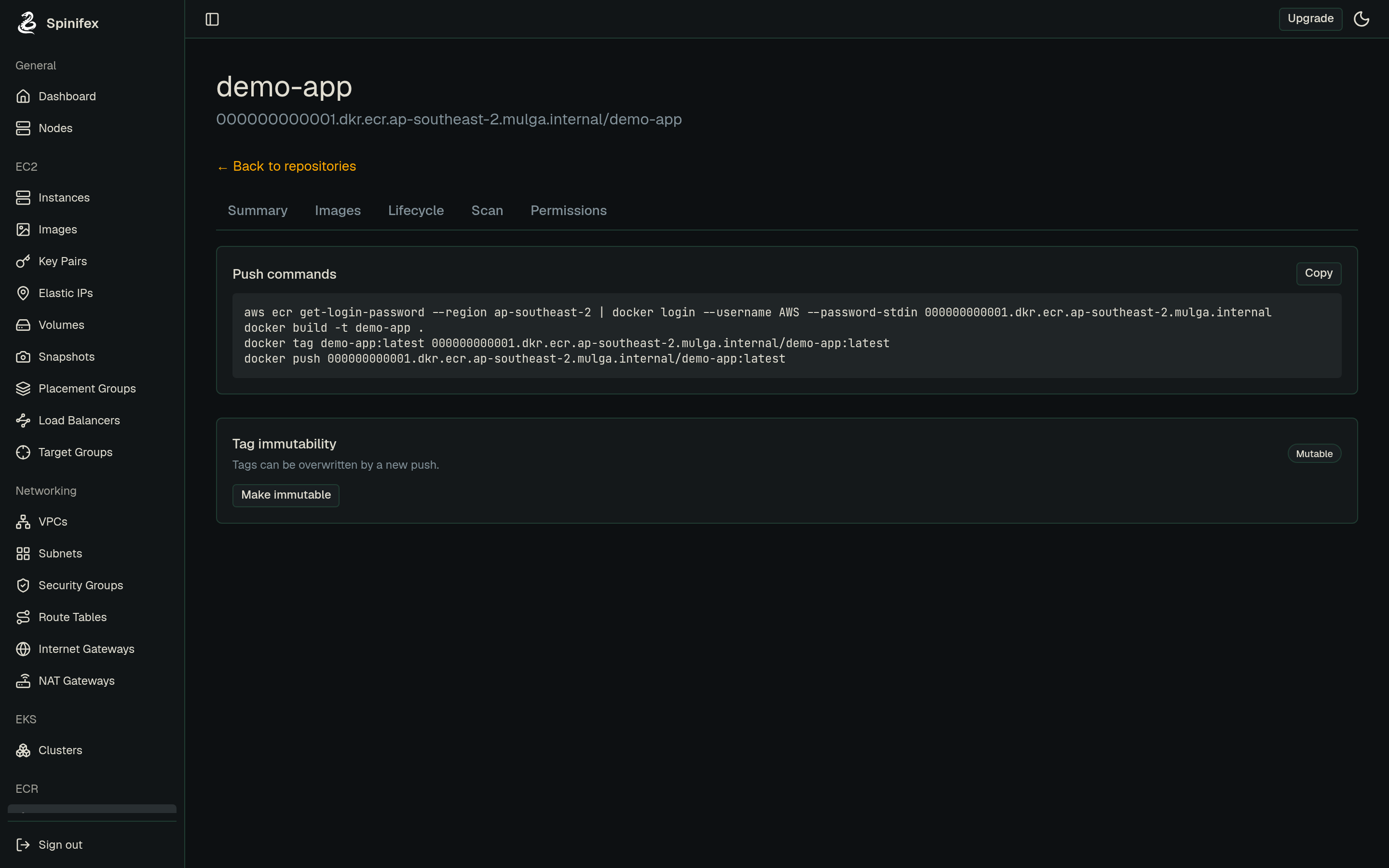
The repositoryUri is the value you tag and push to — the gateway host:9999 with the repository path, port included (for example 192.0.2.10:9999/my-app). Use it verbatim; don't hand-build a hostname.
2. Authenticate Docker
Take the registry host straight from the API so the :9999 port is correct:
REGISTRY=$(aws ecr describe-repositories --repository-names my-app \
  --query 'repositories[0].repositoryUri' --output text | cut -d/ -f1)

aws ecr get-login-password --region <region> \
  | docker login --username AWS --password-stdin "$REGISTRY"
3. Build, tag, and push
docker build -t my-app:latest .
docker tag my-app:latest "$REGISTRY/my-app:latest"
docker push "$REGISTRY/my-app:latest"
4. Verify and pull
aws ecr describe-images --repository-name my-app
docker pull "$REGISTRY/my-app:latest"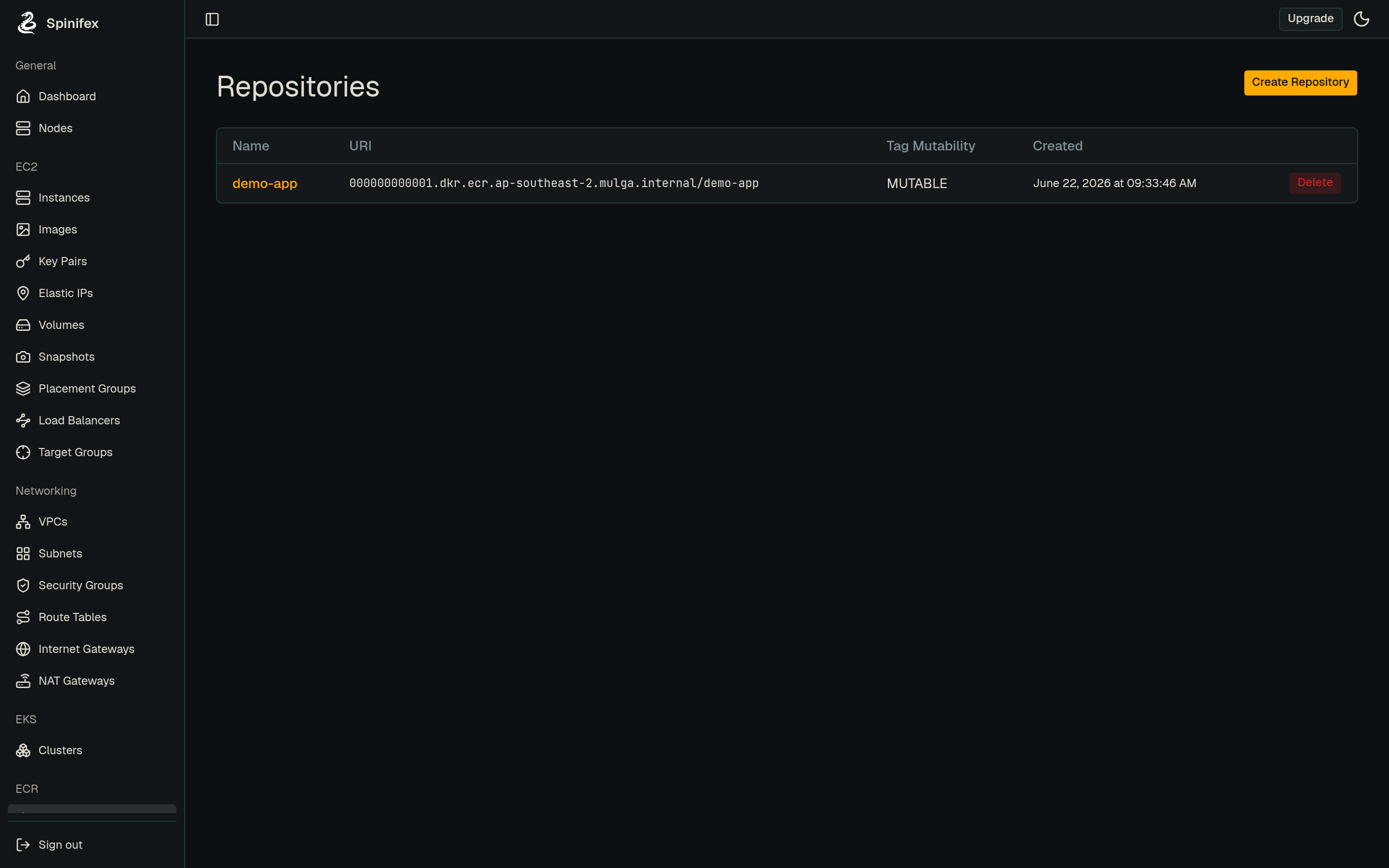
Troubleshooting
docker login fails with an authorization error. The token is account-scoped and short-lived. Re-run aws ecr get-login-password to mint a fresh token, and confirm the registry host in docker login matches your account's endpoint (aws ecr describe-repositories returns it).
docker push cannot reach the registry. Use the exact host from aws ecr describe-repositories — the Spinifex gateway host:9999. Docker dials it directly, so the :9999 port must be present (without it docker tries :443 and fails). If you are using the AWS-parity <account-id>.dkr.ecr… hostname instead, that path needs DNS resolving it to the gateway — prefer the gateway host the API returns.
A containerised tool fails with x509: certificate signed by unknown authority, while docker login and docker push work from the host. The registry token exchange (POST /v2/token) runs in the process that issued the build or push. When that process is itself a container, such as ghcr.io/basecamp/kamal or a containerised CI runner, it checks the registry certificate against the container's trust store, which does not hold the Spinifex CA. Bind-mount the host bundle, which already includes the CA after update-ca-certificates, over the container's bundle:
docker run --rm -it \
  -v /etc/ssl/certs/ca-certificates.crt:/etc/ssl/certs/ca-certificates.crt:ro \
  -v /var/run/docker.sock:/var/run/docker.sock \
  -v "$PWD:/workdir" \
  ghcr.io/basecamp/kamal:latest deploy
Mounting the whole bundle keeps the public roots, so pulls of public base images still verify. Pointing SSL_CERT_FILE at ca.pem alone replaces them and breaks those pulls.
docker buildx build --push fails with an x509 error, while docker push of the same image works. The buildx driver decides whose trust store BuildKit uses. The docker driver runs the BuildKit built into dockerd, which uses the host trust store, so the host CA install above covers it. The docker-container driver, the default for a builder made with docker buildx create, runs BuildKit in its own container, and a CA installed on the host or mounted into the CLI container does not reach it.
Use the docker driver when you can (docker buildx use default, or builder: driver: docker in Kamal's config/deploy.yml). The docker-container route is unavoidable for multi-platform builds and remote builders, which the docker driver cannot do. For those, give BuildKit the CA through its own config:
# buildkitd.toml
[registry."<spinifex-gateway-host>:9999"]
ca = ["/etc/spinifex/ca.pem"]docker buildx create --name spinifex --driver docker-container \
--buildkitd-config buildkitd.toml --usedocker buildx create copies the referenced CA file into the builder container, so recreate the builder after a CA rotation.
EKS workers cannot pull an image. Confirm the node IAM role has AmazonEC2ContainerRegistryReadOnly and that the workers have egress to the registry endpoint (an Internet Gateway or NAT Gateway route). See the EKS prerequisites.
Image-scanning commands return an error. Image scanning is not supported on Spinifex; the scan APIs intentionally reject these calls. Remove scan-on-push configuration from your tooling.
A pushed image still appears after deletion frees no space. Garbage collection of unreferenced blobs is not yet automatic — deleting an image removes its manifest and tags but does not immediately reclaim the underlying layers.