ECS (Elastic Container Service)
Create an ECS cluster on Spinifex, register a task definition, boot container instances, run tasks, and front a service with an Application Load Balancer.
Overview
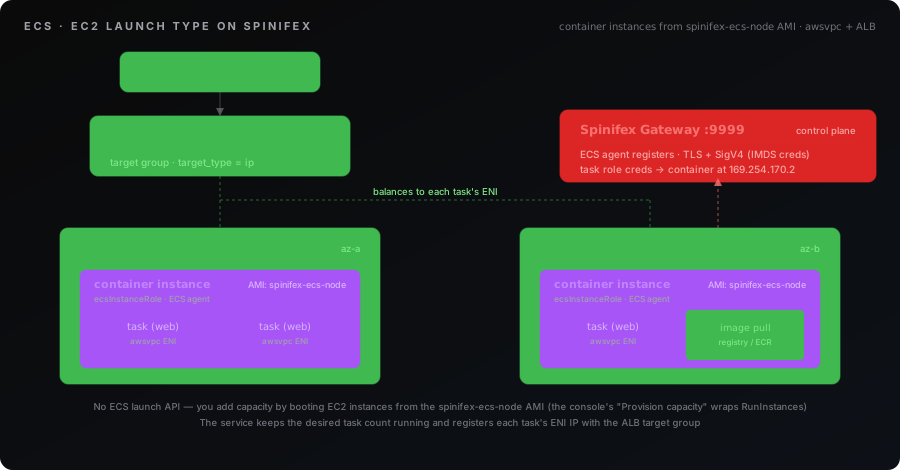
ECS on Spinifex follows the AWS EC2 launch type: you supply the compute. A cluster is a logical grouping; the capacity behind it is container instances — ordinary EC2 instances booted from Spinifex's spinifex-ecs-node image, each running the Spinifex ECS agent. The agent registers the instance with the cluster, reports its CPU/memory, and runs the containers the scheduler places on it.
There is no ECS-specific launch API — this is AWS-faithful. You add capacity by launching EC2 instances from the ECS node image (with the ecsInstanceRole instance profile), exactly as on AWS. The Spinifex console wraps this in a one-click Provision capacity action, but underneath it is just RunInstances.
A task definition describes one or more containers (image, CPU/memory, ports, environment, and an optional task IAM role). A task is a running instantiation of a task definition; the scheduler bin-packs tasks onto instances with free capacity. A service keeps a desired number of tasks running, replaces failed ones, and — when configured — registers each task's IP with an Application Load Balancer target group.
What you'll create:
| Resource | Purpose |
|---|---|
| VPC + subnets | The network the cluster and tasks run in |
| Internet Gateway | Egress so instances can pull container images |
ecsInstanceRole | Instance profile letting the agent reach the control plane |
| ECS cluster | The logical grouping tasks and instances join |
| Task definition | The container spec (image, CPU/memory, ports, task role) |
| Container instance(s) | EC2 VMs from the ECS node image that run tasks |
| Service + ALB target group | Keeps N tasks running and load-balances them |
Spinifex specifics
- EC2 launch type only. There is no Fargate-equivalent serverless capacity; you run and pay for the container instances.
RequiresCompatibilitiesofFARGATEis not honoured. awsvpcnetwork mode. Each task gets its own ENI and private IP in your subnet. Target groups must usetarget_type = "ip"; the service'snetwork_configurationselects the subnets and security groups.- The container-instance image is fixed. Instances must boot Spinifex's
spinifex-ecs-nodeimage (resolve it by thespinifex:managed-by=ecstag) and carry theecsInstanceRoleinstance profile. - Task IAM roles via the credential endpoint. A task with a
taskRoleArngetsAWS_CONTAINER_CREDENTIALS_RELATIVE_URIinjected; the agent serves short-lived credentials for that role at169.254.170.2, AWS-faithful — your container's SDK picks them up with no static keys.
Limitations
ECS v1 is deliberately minimal. Keep these in mind:
- No service discovery.
serviceRegistries/ Cloud Map integration is not implemented — reach a service through its load balancer, not a DNS name. - Only the
json-filelog driver is collected. Container stdout/stderr is captured host-side on the container instance (see Logging); it is not shipped to CloudWatch Logs. Any other driver (e.g.awslogs) is accepted for parity but its logs are discarded —RegisterTaskDefinitionlogs a warning naming the container so the drop is not silent. - No capacity providers or managed scaling. Capacity is the static total of your registered instances; there is no scale-out/in or ASG binding — you manage the instance count.
secrets[]are rejected. A task definition that declares containersecrets[]failsRegisterTaskDefinitionwithInvalidParameterExceptionrather than running without the secrets it expects. Tags set viaTagResourceare not persisted, and health-check settings beyond the target group default are not forwarded.
Logging
Spinifex honours the host-side json-file log driver (the containerd default). A container's stdout/stderr is written on its container instance and retrievable there — no CloudWatch Logs path exists.
To read a task's logs, find the container instance running it (aws ecs describe-tasks → containerInstanceArn → the EC2 instance), then on that host inspect the containerd task output. Containers are named {taskId}-{containerName} and carry mulga.ecs.* labels:
# On the container instance:
ctr -n default containers ls                 # find {taskId}-{containerName}
ctr -n default tasks ls
journalctl -u containerd | grep <taskId>     # container stdout/stderr via the host journal
A task definition may still declare awslogs (or any other driver) for AWS compatibility — Spinifex accepts it, warns at registration that the driver is not implemented, and falls back to the host-side json-file behaviour.
Deployments
An UpdateService to a new task-definition revision performs a health-gated rolling update honouring deploymentConfiguration: minimumHealthyPercent keeps that fraction of the desired count running while maximumPercent bounds how many extra tasks launch during the roll. Enabling the deployment circuit breaker fails a rollout whose tasks repeatedly fail to start, and — with rollback set — automatically reverts to the last-good task definition.
Execution role
If a task definition sets executionRoleArn, the agent assumes that role to authorise ECR image pulls (instead of the container-instance role). When it is unset, pulls fall back to the instance role.
Prerequisites
Prerequisite — spinifex-ecs-node image required.
Container instances must boot Spinifex's spinifex-ecs-node image — it carries the ECS agent. Import it before provisioning capacity (during spx admin init or via the image catalogue); the console's provision-capacity action and the Terraform workbook both resolve it by tag.
Verify before continuing:
aws ec2 describe-images \
  --filters 'Name=tag:spinifex:managed-by,Values=ecs' \
  --query 'Images[].[ImageId,Name]' --output text
No rows means the image is not imported — register it before continuing.
The Terraform workbook builds all of this for you. For the CLI or console paths, have it in place first.
- Spinifex running, with the AWS CLI configured for the
spinifexprofile (see Installing Spinifex). - The
spinifex-ecs-nodeimage imported. Confirm it resolves:
``bash aws ec2 describe-images \ --filters 'Name=tag:spinifex:managed-by,Values=ecs' \ --query 'Images[].[ImageId,Name]' --output text ``
- A VPC with at least one subnet and an Internet Gateway with a default route (
0.0.0.0/0 → IGW), so instances can pull container images. - The
ecsInstanceRoleinstance profile. It is account-global: a role trusted byec2.amazonaws.comwith anecs:*policy, exposed through an instance profile of the same name. The console's provision-capacity action creates it on first use; the Terraform workbook creates it unless you opt out. - An optional task IAM role trusted by
ecs-tasks.amazonaws.com, if your containers call AWS APIs.
Instructions
The same workload can be created three ways. Pick your tool — each path reaches the same running service.
1. Create the cluster
export AWS_PROFILE=spinifex

aws ecs create-cluster --cluster-name demo
2. Register a task definition
awsvpc network mode, EC2 launch type, one nginx container on port 80:
aws ecs register-task-definition \
  --family web \
  --network-mode awsvpc \
  --requires-compatibilities EC2 \
  --cpu 256 --memory 512 \
  --container-definitions '[{
    "name":"web",
    "image":"docker.io/library/nginx:1.27-alpine",
    "portMappings":[{"containerPort":80,"protocol":"tcp"}],
    "essential":true
  }]'
3. Add capacity
Launch one or more EC2 instances from the ECS node image with the ecsInstanceRole instance profile and a cloud-init that points the agent at the cluster. The ECS Quickstart workbook produces this user-data for you; the console Provision capacity action is the one-click equivalent. Once an instance boots and its agent registers, it appears here:
aws ecs list-container-instances --cluster demo4. Run a task or create a service
Run a one-off task:
aws ecs run-task \
  --cluster demo --task-definition web --count 1 \
  --network-configuration 'awsvpcConfiguration={subnets=[subnet-aaaa]}'
Or keep it running behind an ALB target group (target_type = ip):
aws ecs create-service \
  --cluster demo --service-name web --task-definition web \
  --desired-count 2 \
  --network-configuration 'awsvpcConfiguration={subnets=[subnet-aaaa]}' \
  --load-balancers 'targetGroupArn=<tg-arn>,containerName=web,containerPort=80'

aws ecs describe-services --cluster demo --services web \
--query 'services[0].[runningCount,desiredCount]'Troubleshooting
No container instances appear after launching them. The agent registers over the gateway, not a managed endpoint, so check its cloud-init injected a correct LAN-reachable gateway URL (not 127.0.0.1 — a guest VM cannot reach the host loopback) and the gateway CA. cloud-init write_files runs once per instance, so fixing the user-data needs an instance replacement, not an in-place modify. Confirm the instance carries the ecsInstanceRole instance profile.
Tasks stay PENDING. No instance has free capacity for the task's CPU/memory reservation. Add capacity, or lower the task definition's reservations. aws ecs list-container-instances should show at least one ACTIVE instance.
Service runningCount below desiredCount. Either there is not enough capacity (see above), or tasks are failing to start — check the task's containers can pull their image (instances need an egress route) and that the image reference is valid.
Load balancer target unhealthy / app unreachable. The target group must be target_type = ip (tasks register their ENI IP, not an instance ID). The ALB DNS name ends in .elb.spinifex.local and does not resolve from outside; fetch its public IP with aws elbv2 describe-load-balancers and curl that. Note health-check settings beyond the target group default are not forwarded.
Container cannot assume its task role. Confirm the task definition sets taskRoleArn and the role is trusted by ecs-tasks.amazonaws.com. The agent injects AWS_CONTAINER_CREDENTIALS_RELATIVE_URI; a container that overrides this variable, or an SDK too old to honour it, will not pick up the credentials.
Expected a feature that is missing. ECS v1 omits service discovery, CloudWatch Logs (awslogs) shipping, and capacity providers / managed scaling. See the Limitations in the Overview.